School Website Chatbots: What They Should Answer, and What They Shouldn’t
School Website Chatbots: What They Should Answer, and What They Shouldn’t
A school website chatbot is a small chat window on your site that answers visitors’ questions straight away. Parents, students and prospective families type a question, and the AI chatbot replies using what’s already on your school website. The good ones answer only from approved information on your own pages, show where each answer came from, and send anything sensitive to the school office instead of guessing.
That last part matters more than anything else in this guide. A chatbot that answers routine questions well takes real pressure off the office. One that makes things up about admissions, SEND or safeguarding does real damage, and quickly.
We’ve now switched on the chatbot in the Schudio AI Suite, so we’ve spent a lot of time thinking about where the line sits. This guide is for headteachers, business managers and trust leaders deciding whether a chatbot belongs on their school website, and how to set one up so it helps families rather than confuses them. If you want the wider picture of what AI does inside a school website platform, our pillar guide to AI school website software covers that. Here we’re focusing on the chatbot alone.
The Short Answer: What a School Website Chatbot Should Do
A school website chatbot should:
- Answer routine questions from parents and students, such as school hours, term dates, uniform, clubs, lunches and how to contact the school.
- Use only your approved information. Its knowledge base should be your own published pages and documents, nothing else.
- Show its sources, with a link to the page the answer came from, so the visitor can check it.
- Say when it doesn’t know, and point the visitor to the right office contacts.
- Never improvise on sensitive subjects: admissions decisions, safeguarding, SEND, exclusions, complaints and anything about an individual child.
- Stay away from student data. It doesn’t need pupil records to answer “what time does school finish on a Friday?”
What Is a School Website Chatbot?
A chatbot is software that holds a short written conversation with a visitor. Older chatbots worked from a fixed script: click “Admissions”, then “Primary”, then “Open events”, and get a canned answer. An AI chatbot is different. It reads the visitor’s question in their own words and writes a reply.
How a grounded AI chatbot works
The safest kind of AI chatbot for a school is “grounded”. When a parent asks a question, the bot first searches your own website for the passages most likely to hold the answer. It then writes a short reply using only those passages, and links to the page they came from. If nothing on your site is a close enough match, it doesn’t answer at all. It tells the visitor it can’t help with that one and gives them the school’s contact details.
That design means the chatbot can only ever be as accurate as your existing content. It can’t know something your website doesn’t say, which sounds like a limitation but is really the point.
How it differs from ChatGPT or a general bot
A general AI tool such as ChatGPT has never read your website. It doesn’t know your term dates, your uniform supplier or your office hours, and it doesn’t know what a maintained school is expected to publish. Ask it a question about your school and it’ll often produce something plausible and confident that’s simply wrong. That’s no use to a parent trying to work out whether school closes early on the last day of term.
The difference is the knowledge base. A school website chatbot built properly treats your own pages as the only source of truth, and treats “I don’t know” as a perfectly good answer.

Why Schools Are Looking at Chatbots Now
Many schools have looked at chatbots before and decided they weren’t worth the risk. Three things have changed, and the benefits for schools are now much easier to see.
Parents ask questions at night and at weekends
Families and students don’t read the school website at 10am. They read it at night, after the children are in bed, or on a Sunday afternoon while they sort out the week. That’s exactly when the office is closed. A parent who can’t find the answer either gives up, sends an email that sits in the inbox until Monday, or rings at 8.30 the next morning alongside everyone else.
A chatbot gives parents and students accurate answers immediately, in real time, with a link to the page it came from, whenever they happen to be asking.
Admissions season brings the same questions every year
Admissions is where this matters most. The national deadlines in England are fixed, and they drive a predictable wave of common questions:
- Secondary school places: applications usually open on 1 September and must be made by 31 October. Offers go out on 1 March.
- Primary school places: applications open in September and close on 15 January. Offers go out on 16 April.
Those dates come from GOV.UK’s school admissions guidance. Families apply through their local council, not through the school, although sixth form places are usually applied for directly. Every year, the same simple questions arrive from families and Year 6 and Year 11 students in the same weeks. When’s the open evening? Do I apply to you or the council? Is there a waiting list? What’s the catchment? A good chatbot can answer those from your admissions page for prospective students and their families, and send them to the council’s own form for the application itself.
We’ve written before about what parents look for before visiting a school. Being able to get a straight answer quickly is a big part of the impression a school makes.
The office inbox is full of repetitive questions
Ask any school business manager what fills the office emails and you’ll hear the same list: term dates, INSET days, uniform, dinner money, after school clubs, how to report an absence. Most of the answers are already on the school website. People just can’t find them, or don’t want to look.
A chatbot that handles those repetitive questions doesn’t replace the office team. It gives them some capacity back, so they can focus on the conversations that really need a person. It’s a small but real way to reduce workload without anybody doing less.
What a School Website Chatbot Should Answer
Think of the chatbot as a well briefed receptionist who has read every page of your website and nothing else, and who is very good at answering simple questions. These are the questions it should handle comfortably.
School hours, term dates and the school calendar
Start and finish times, the schedule for the school day, early closures, INSET days, holiday dates and upcoming events. These are the most common queries on any school website, and the answers sit on one or two pages. As long as your school calendar and term dates pages are current, the chatbot can answer these accurately every time.
Admissions questions
How to apply, key dates, open events, your published admission arrangements, and who to contact. The chatbot should explain the process and link to your admissions page. It should never tell a family whether their child is likely to get a place, or interpret oversubscription criteria for their particular circumstances. That’s a conversation for a person.
Uniform, clubs, lunches and the everyday detail
Where to buy uniform, what PE kit is needed, which clubs run on which days, how school meals work, what time the breakfast club opens. These simple questions make up a surprising share of what families ask, and they’re easy wins.
Where to find policies and documents
Families and older students often want a specific document: the behaviour policy, the latest newsletter, the charging policy. A chatbot is very good at pointing someone to the right page or document. It should link to the policy itself rather than summarise it, because school policies are carefully worded for a reason and a paraphrase can change the meaning.
Student support and who to talk to
Good student support starts with knowing who to ask. Students and families often just need a name and a route. Who’s the SENCO? How do I contact my child’s form tutor? Who do I speak to about a worry? The chatbot can give students and parents the role, the published contact route and links to the right resources and support. It shouldn’t attempt the conversation itself.
What a School Website Chatbot Should Not Answer
This is where suppliers differ most, and where you should be most demanding. Some subjects need a person every time, however good the technology looks in a demo.
Safeguarding and anything about a specific child
If a visitor types something that suggests a child may be at risk, the chatbot must not try to help. It should give the school’s published safeguarding contact details and, where it’s appropriate, the emergency services. It should never summarise, advise or reassure. Keeping Children Safe in Education is built around concerns reaching trained staff and the designated safeguarding lead, and nothing about a chatbot changes that.
The same goes for any question about individual students or a particular child: attendance, behaviour incidents, a particular class or a particular teacher. The chatbot doesn’t have that information and shouldn’t pretend to.
SEND and individual circumstances
Your SEND information report and SEND policy are public, and the chatbot can point families to them. What it shouldn’t do is tell a parent whether their child will get support, what an EHC plan will say, or how the school will meet a specific need. Those answers depend on the child and the context, and a wrong answer can cause real upset.
Complaints, exclusions and disputes
Point people to the complaints procedure and the right contact. Don’t let the chatbot try to resolve anything, explain a decision or comment on a dispute. A family raising a concern deserves to speak to a person.
Anything that isn’t on your website
If the answer isn’t in your approved information, the right response is “I can’t help with that, here’s how to contact the school”. A bot that fills gaps with general knowledge is the one that eventually tells a parent the wrong date for an open evening, or describes a policy you don’t have.
Your Chatbot Is Only as Good as Your School Website
This is the bit that catches schools out. A grounded chatbot answers from your existing content, so every weakness in that content shows up in its responses.
Out of date pages give out of date answers
If last year’s term dates are still on the site, the chatbot will find them. If the uniform page still names a supplier you stopped using in 2024, the bot will send parents there. The chatbot isn’t wrong, strictly speaking. It’s faithfully repeating a page nobody updated.
That’s why we describe a school website as a maintenance job rather than a build job. In The State of School Website Compliance, based on 247 real audits, only 6.5% of school websites were fully compliant. Governance information was the most common gap, missing or incomplete on 49.8% of the sites we audited, with SEND (35.3%) and admissions (34.2%) not far behind. Those are exactly the pages families ask about.
Documents and PDFs
Plenty of information that families and students need sits in PDFs: newsletters, policies, remote learning plans, the admissions booklet. Check that the documents on your site are the current versions and that the key facts in them, such as dates and contacts, also appear on a web page. A page is easier for families to read and easier for the chatbot to answer from.
Gaps show you what’s missing
There’s an upside. When a chatbot can’t answer a question, that’s useful feedback. It usually means a page is missing, unclear or out of date. A school that pays attention to what the chatbot couldn’t answer gets a steady list of website improvements, straight from what your school community actually wants to know.
Student Data, Privacy and Safety
Any AI tool near a school raises fair questions about data. For a website chatbot, the honest answers are mostly reassuring, as long as you ask them.
It doesn’t need student data
A chatbot answering questions about your published website needs your published website. It doesn’t need access to your MIS, pupil records or anything that holds student data. If a supplier’s chatbot wants that kind of connection to answer routine questions, ask why. The DfE’s policy paper on generative AI in education recommends that personal data isn’t used in generative AI tools at all, and that schools take every step to protect it where it’s strictly necessary.
Parents will type in personal details
Even if the chatbot never touches your records, visitors will sometimes type a child’s name, a medical detail or a family situation into the chat box. Schools should ask their supplier exactly what happens to those conversations: what’s kept, for how long, where, and who can see it. The DfE’s guidance on generative AI and data protection in schools says schools must include how data is collected, processed and stored by generative AI tools in their privacy notice. So if you add a chatbot, update your privacy notice and tell your data protection officer.
What the DfE product safety standards ask of suppliers
The DfE has published product safety standards for generative AI, last updated on 19 January 2026. They’re written mainly for products that pupils and teachers use, so a parent-facing website chatbot isn’t the exact target. They’re still a very useful yardstick. They cover filtering, monitoring and reporting, security, privacy and data protection, intellectual property, design and testing, and governance. Two lines stand out for anyone buying a chatbot: suppliers “should not exaggerate the impact or capabilities of their tools”, and the DfE expects “a clear risk assessment” for every product and “a formal complaints mechanism”. Ask any supplier to show you both.
What about KCSIE and Ofsted?
Keeping Children Safe in Education 2026 now talks about generative AI directly in its online safety section, and points schools to the DfE’s policy paper for the safety considerations. Ofsted says it doesn’t directly evaluate the use of AI and doesn’t expect schools to use it, although inspectors may ask what risks leaders considered. A short note in your online safety or AI policy explaining what the chatbot does, and what it’s deliberately not allowed to do, covers both. We’ve set out the wider limits in What Schools Should Not Use AI For.
How to Get Ready Before You Switch It On
You’ll get far more from a chatbot if you spend a week on preparation first.
Step 1: Review the pages parents use most
Start by deciding what you want the chatbot to focus on, and plan the pages that support it. Check term dates, the school calendar, school hours, admissions, uniform, clubs, school meals, contact details and your SEND information. Make sure each one is current and says what it needs to in plain English. If you only fix ten pages, fix these.
Step 2: Get your contact details and office hours exactly right
Every time the chatbot can’t help, it sends the visitor to the office. So the office contacts on your site need to be right: phone number, email address, opening hours, and which departments or teams handle attendance, admissions, SEND and safeguarding. Check the details on every page, not just the contact page.
Step 3: Test it with the questions families really ask
Ask the office team for the twenty questions parents and students ask most often, then put every one to the bot. Check each answer against the source page it links to. Then test the edges: ask about a specific child, a complaint, an exclusion and a safeguarding worry, and make sure each one is handed to the office.
Step 4: Tell families what it is
Be open about it. A short line in the chat window and a mention in your next newsletter is enough: it answers from our website, it shows you where the answer came from, and for anything about your child, please contact the office. People are far more comfortable with AI when it’s honest about what it is.
Step 5: Keep your content current
Once it’s live, the chatbot depends on your pages staying up to date. Add a quick check to the routine you already have: when the term dates change, when a policy is updated, when a club stops running. A calm, steady habit is far better than a big tidy up once a year. Our Always Ready approach works the same way.
Questions to Ask Any Chatbot Supplier
Whichever product schools are looking at, these questions sort the careful suppliers from the rest.
- Where does it get its answers? If the answer isn’t “only from your school’s own approved content”, it can invent things, and eventually it will.
- What happens when it doesn’t know? You want to hear that it says so and points to the school office.
- Does it show its sources? Every answer should link to the page it came from.
- How does it handle safeguarding, SEND and admissions questions? Ask for a live demonstration, not a slide.
- Does it need student data? For a website chatbot, it shouldn’t.
- What’s kept from conversations, and for how long? Get it in writing for your privacy notice.
- Can we see the risk assessment and the complaints route? The DfE standards expect both.
- Is it accessible? The chat window should work with a keyboard and a screen reader, like the rest of your school website.
How the Schudio AI Chatbot Works
We built ours around the rules in this guide, because we think they’re the only safe way to put an AI chatbot on a school website.
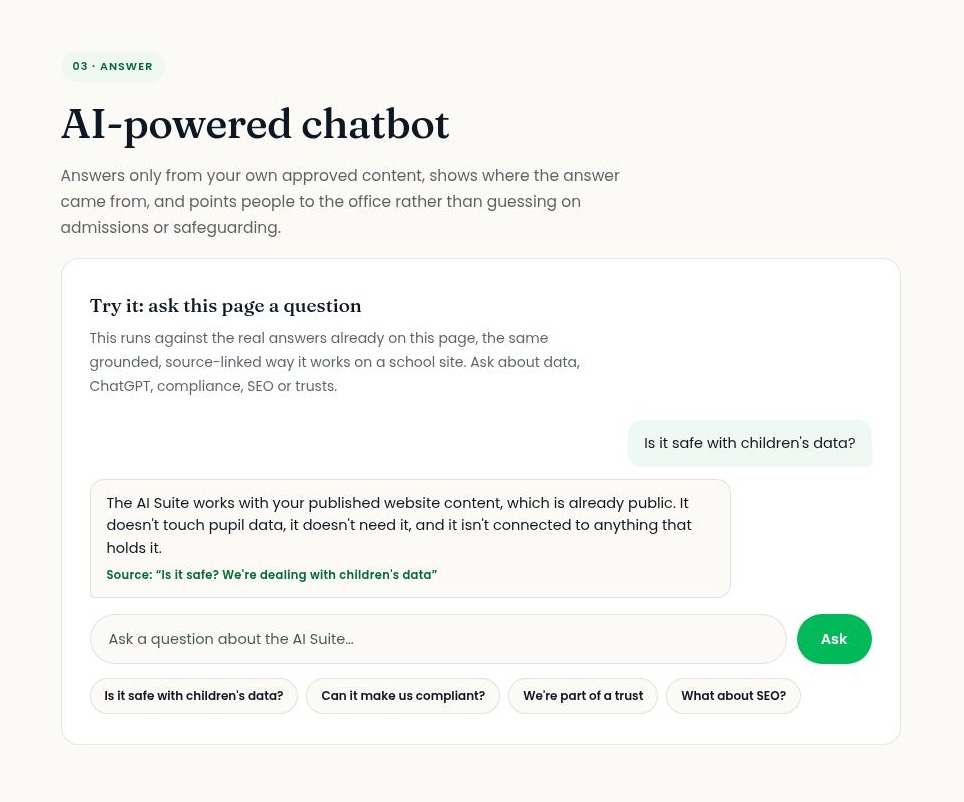
- It answers only from your own approved content on your school website.
- It shows where each answer came from, so visitors can check it for themselves.
- When it doesn’t know, it says so and points people to the school office rather than guessing, and it doesn’t improvise on admissions, term dates, safeguarding or SEND.
- It doesn’t touch pupil data, doesn’t need it, and isn’t connected to anything that holds it.
It’s one part of the Schudio AI Suite, alongside AI-powered compliance audits and Write with Schudio, which drafts page content in your school’s voice. We’ve written about the writing side in How AI Can Save Time on School Newsletters and Website Content. The Suite is included as standard on every new Schudio website. Existing Schudio clients can add it at any time from the CMS dashboard, or just ask us to turn it on. For a multi-academy trust it’s one decision for the whole trust rather than something each school opts into, and our trust team can talk that through.
If you’d like to see it working, try the chatbot on the AI Suite page itself. It answers from that page in exactly the same grounded, source-linked way it works on a school site.
A Practical School Website Chatbot Checklist
Use this before you switch a chatbot on, and again each term.
Before launch
- Term dates, school hours and the school calendar are current.
- Admissions page shows this year’s dates, open events and how to apply.
- Uniform, clubs, school meals and before and after school care pages are accurate.
- Office contacts and opening hours are correct on every page.
- SEND information report and key school policies are the latest versions.
- Old documents and out of date pages have been removed or replaced.
Testing
- The office team’s twenty most common questions all get accurate answers.
- Every answer links to the right source page.
- Questions about safeguarding, a specific child, SEND support, exclusions and complaints are all passed to the office.
- A question the website can’t answer gets an honest “I don’t know”.
Data and policy
- The chatbot has no access to student data.
- You know what’s kept from conversations and for how long.
- Your privacy notice mentions the chatbot.
- Your data protection officer has seen it.
- Your online safety or AI policy says what it does and doesn’t do.
After launch
- Families have been told what it is and what it’s for.
- Office staff have had a short briefing or training on what the bot answers and what it passes to them.
- Someone owns the content behind it and checks it each term.
- Questions it couldn’t answer are used to improve the website.
Common Mistakes to Avoid
Switching it on before the website is ready
The most common mistake schools make, by far. A chatbot doesn’t fix an out of date website, it broadcasts it. Fix the ten most visited pages first.
Choosing a chatbot that answers everything
It looks impressive in a demo when a bot answers every question confidently. On a school website, that’s a warning sign. The right chatbot is comfortable saying “I don’t know”.
Letting it summarise policies
A paraphrased behaviour or charging policy can quietly change what the policy says. Point to the document instead.
Forgetting the privacy notice
It’s an easy one to miss. If a generative AI tool processes anything a visitor types, your privacy notice should say so.
Treating it as a replacement for the office
A chatbot takes the routine questions. It doesn’t take the worried parent, the complaint or the family in a difficult situation. Schools should make sure families can always reach a person easily, and the chatbot should make that easier, not harder.
Setting it up and walking away
The chatbot is only as current as your content. Build a quick termly check into your existing routine.
Frequently Asked Questions
What is a school website chatbot?
It’s a chat window on a school website that answers questions from parents, students and other visitors automatically. The safest kind is an AI chatbot that answers only from the school’s own published pages, shows where each answer came from, and refers anything it can’t answer to the school office.
Is an AI chatbot safe on a school website?
It can be, if it’s grounded in your approved information, never improvises on sensitive subjects, doesn’t need student data, and hands anything about safeguarding or an individual child to a person. Check the supplier’s risk assessment and what happens to conversation data.
Will a chatbot replace our school office?
No. It takes routine questions from parents and students off the office team, especially at night and at weekends, so staff have more time for the conversations that need a person. Families should always be able to contact the school directly.
Does a school website chatbot need access to student data?
No. A chatbot answering questions about your published website only needs your published website. The DfE recommends that personal data isn’t used in generative AI tools.
Can the chatbot answer admissions questions?
It can explain the process, key dates and open events from your admissions page, and point families to their local council to apply. It shouldn’t advise whether a child is likely to get a place.
What happens if the chatbot gives a wrong answer?
With a grounded chatbot, a wrong answer almost always means a page on your website is wrong or out of date. Fix the page and the answer fixes itself. Because each answer links to its source, it’s quick to find the problem.
Do we need to tell parents we’re using a chatbot?
Yes, it’s good practice. Say what it does and doesn’t do, mention it in your privacy notice, and make it clear how to reach a person.
Final Thought: Ready Answers, Not Clever Ones
The best chatbot isn’t the cleverest one. It’s the one that gives families a quick, accurate answer from your own pages at nine o’clock at night, and knows exactly when to say “please contact the school”. Get your content right, set clear limits, and test it properly, and a chatbot becomes one more way your website is ready for families, all year round.
If you’d like help getting your website ready for families, our free school and trust marketing workshops are a good place to start, and our School Website Requirements guide sets out what your site needs to publish.

Related Posts

Ian Richardson
October 20, 2026
What should a school website look like in 2027? The school website trends that matter for UK schools and trusts, with a practical checklist and an FAQ.
Ian Richardson
October 13, 2026
AI-generated school content saves time, but accuracy, tone and safeguarding still need a person. What DfE guidance says, who reviews what, and a checklist.
Ian Richardson
September 30, 2026
What schools should not use AI for, the AI safeguarding risks behind each limit, what KCSIE 2026 now says, and a practical checklist for school leaders.
Ian Richardson
September 16, 2026
Introducing the Schudio AI Suite: AI school website software that checks what you publish, drafts pages in your school's voice and answers parents' questions.
Ian Richardson
July 29, 2026
What parents look for in a school, and how your website answers it before they visit: culture, safeguarding, SEND support and clear practical information.
Ian Richardson
June 24, 2026
A school website says a lot before a parent reads a full page. Parents make ..