Free School Website Tools
Practical resources for the jobs that eat an office afternoon. Free, no sign-up, and nothing you put into them leaves your device. Built by people who look after school websites for a living.
Five free tools for school offices
School Image Resizer
One photo, every size a school website and its social accounts need. 78 exact sizes, including the pixel dimensions the Schudio system crops to, measured from 265 live school websites.
Because platforms crop from the centre, and that is how children lose the tops of their heads.
Accessibility Statement Generator
A few questions and you have the accessibility statement your school website is required to publish. It works your compliance status out from your answers rather than letting you choose one.
Because schools are partially exempt, not exempt, and most published statements get that wrong.
Reading Age Checker
Paste a letter, a newsletter or a policy and see its reading age, the sentences that run too long, and the school jargon parents do not follow.
Because a letter can score well on readability and still be incomprehensible.
Clean Word Formatting
Paste a letter, newsletter or policy straight out of Microsoft Word and get tidy content your website will not mangle. Nothing you paste ever leaves your browser.
Because Word brings its own formatting with it, and your page inherits every bit of it.
School Domain Lookup
Type your school web address and see who holds the registration, who you actually renew it with, who runs your website and who runs your email, all in plain English.
Because Nominet never publishes a renewal date for a sch.uk address, so the only way to know is to ask whoever holds it.
Who these resources are for
Most resources about school websites are written for people who work on websites full time. In education, that is almost never who updates them.
Who actually updates a school website
Usually one person in the office. Sometimes a teacher with a free period, occasionally a senior leader at nine at night, quite often a teaching assistant who turned out to be good with computers. Very rarely anyone with training in it, and almost never anyone with a spare hour. Tools that assume a designer are no use in education.
That shapes everything here. Each of these free resources does one job, needs no install, and can be finished between other things.
Everyone involved wants something different
Teachers usually want to publish one thing quickly, a class page or a trip letter. Office staff carry the recurring jobs: admissions, term dates, policies and the endless small corrections. School leaders tend to arrive when something is wrong or an inspection is close. Parents skim for one fact on a phone in the evening, and students arrive from a shared link wanting a single page rather than a tour. The resources here are meant to help all of them, because in most schools they are the same two people.
Images and photographs
Pictures are where most of the time goes in schools, and where most of the quality is won or lost.
Get the pixel dimensions right once
Resizing photographs is the most common job in a school office, and the one most often done five times over: once for the website, then again for every social account. Oversized images are also the single most common cause of a slow school website, and resizing before uploading is a fix an office can apply without a developer.
The School Image Resizer, the most used of these tools, holds 78 exact sizes, including the pixel dimensions the Schudio system crops to, measured from 265 live school websites.
Cropping without losing the child
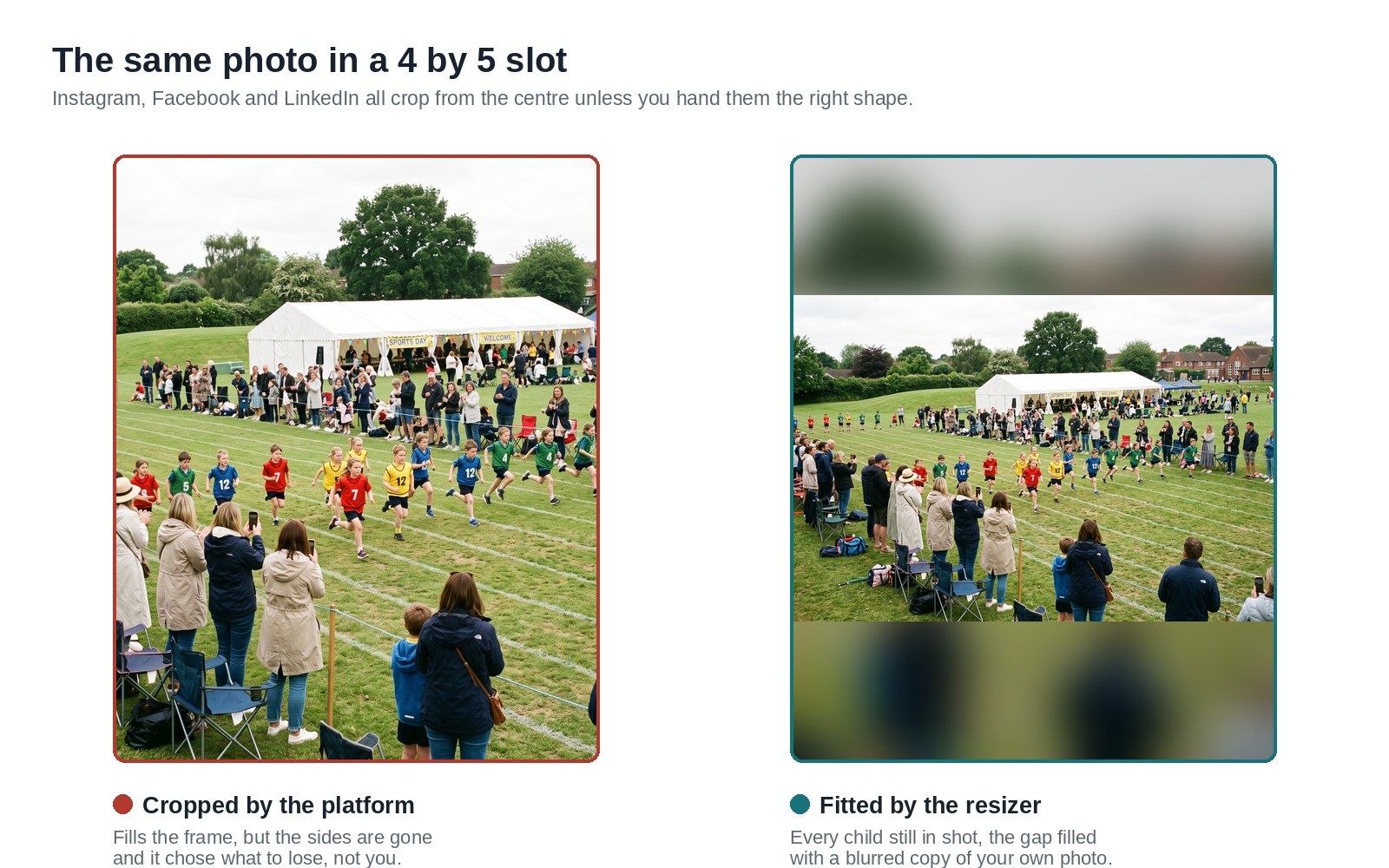
Websites and social platforms crop to their own frame and cannot tell which part of the photograph mattered. Choosing the focal point yourself is the difference between a class photograph and a row of foreheads.
The slots that catch people out
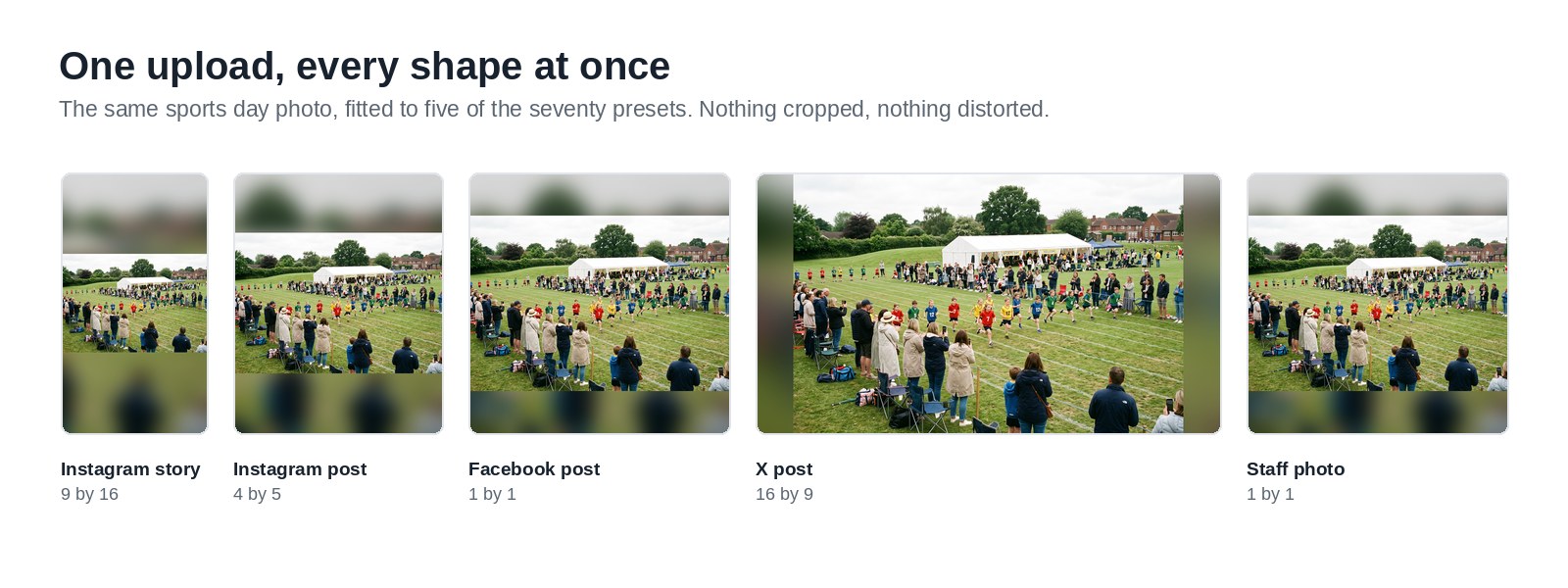
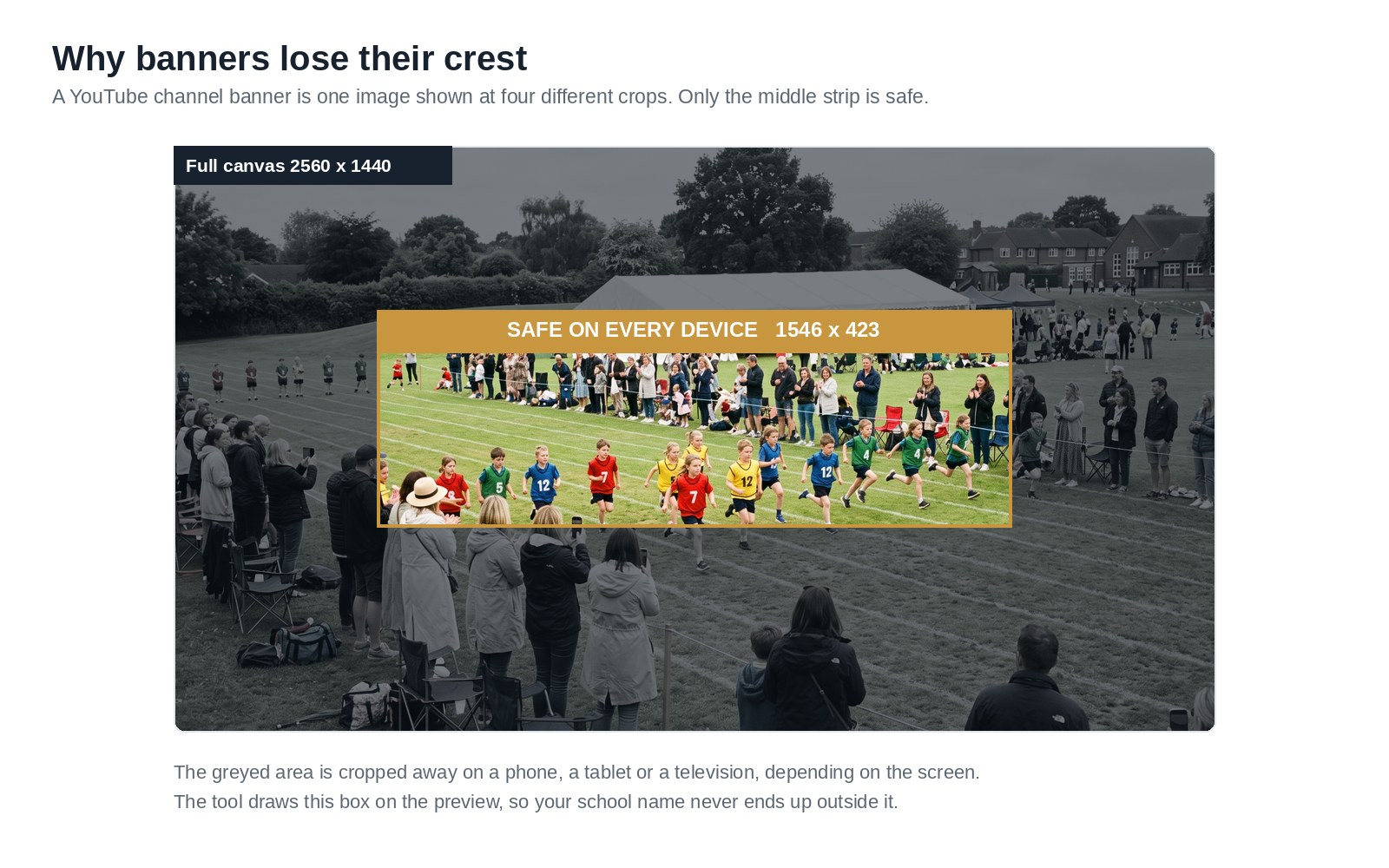
Staff photographs want to be square and consistent, because a staff page where every picture is a different shape looks unloved, and it is the page prospective parents click first. News thumbnails are seen at postage stamp size, so choose one clear subject. Banners are cropped differently on every screen, so design for the narrowest crop.
Writing for parents
A school website is mostly writing, and two of these tools exist for it. These are the jobs worth doing deliberately.
Aim for a reading age of nine to twelve
That is the range UK government guidance uses for writing aimed at the public, and long sentences push it up faster than long words do. It sounds low. It is not about intelligence, it is about a parent reading your letter on a phone with a toddler pulling at their arm. Policies can read harder, but the summary at the top should not.
The Reading Age Checker gives you the number, the sentences that run too long, and the school jargon parents do not follow. Most communication with families now happens through these pages, so it is worth the ten minutes.
Say what the jargon means the first time
EHCP, SENCO, provision map and age related expectations are everyday words in a staffroom and invisible to a parent. It helps to explain them once. That matters most around special educational needs, where the distance between what a school means and what a family understands does real damage to children who need the support.
What Word brings with it
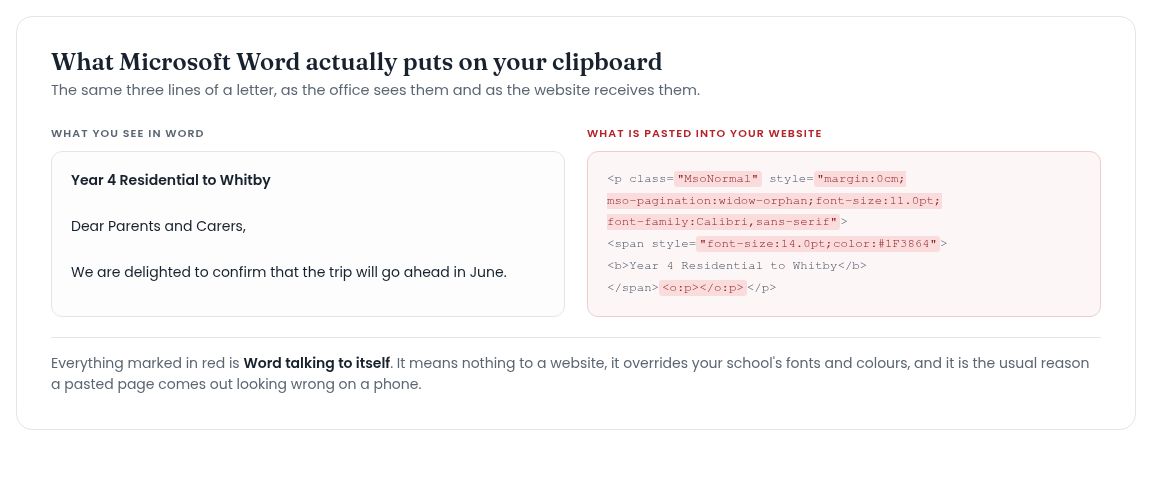
Almost every school letter starts in Word, and pasting it into a page brings the whole document along: fonts, point sizes and a great deal of markup that means nothing on the web.
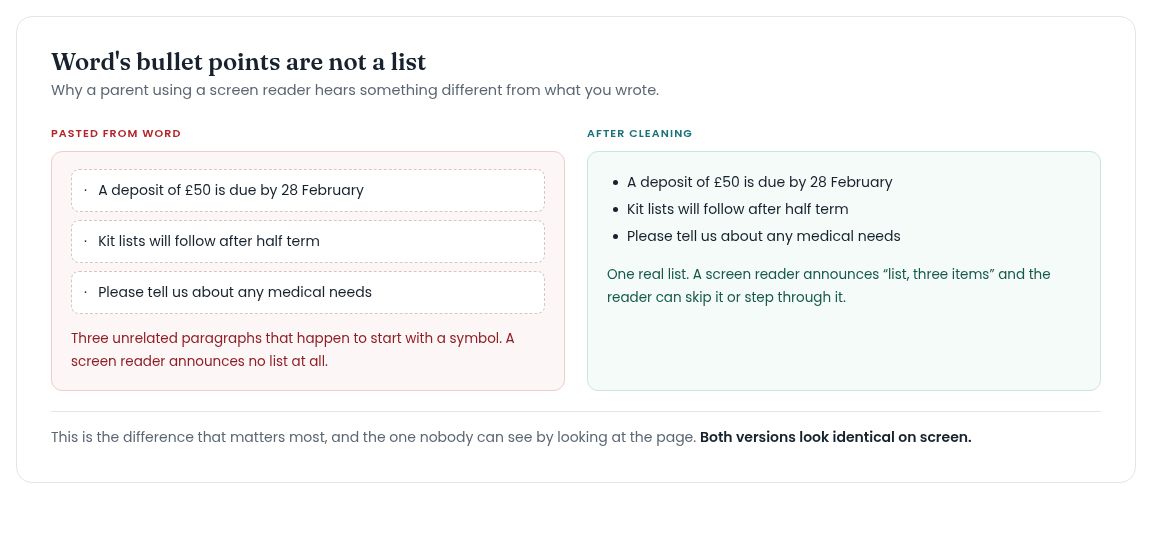
The one that matters most is invisible. Word usually writes a bulleted list as ordinary paragraphs that happen to begin with a symbol, so a parent using a screen reader is never told a list is there. Clean Word Formatting strips the rest and rebuilds those as real lists.
Compliance and accessibility
The part that gets attention once a year and then quietly drifts.
Most schools are close, and very few are finished
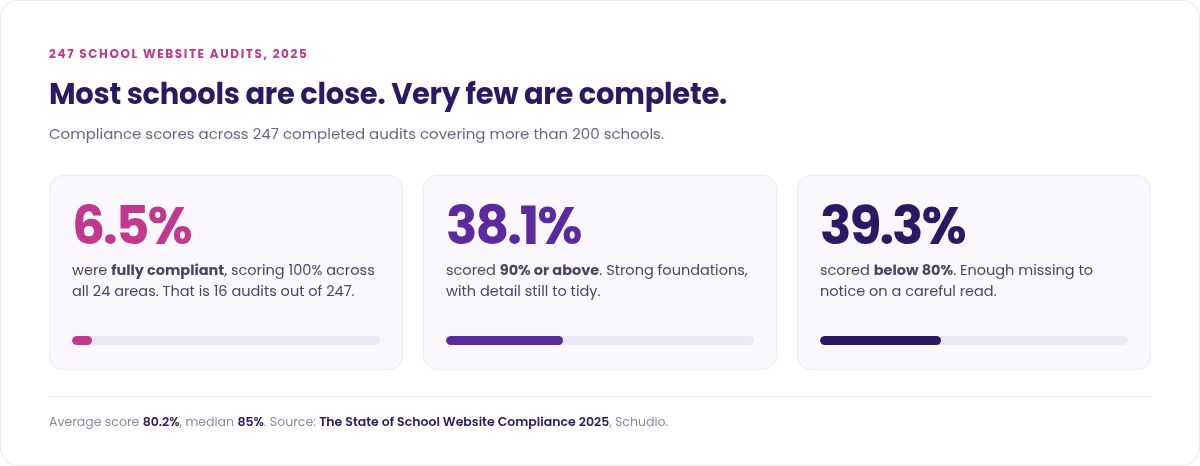
The average score was 80 per cent and only 6.5 per cent were fully compliant. That is a sector finishing most of a job that only counts when it is complete.
The areas that go missing
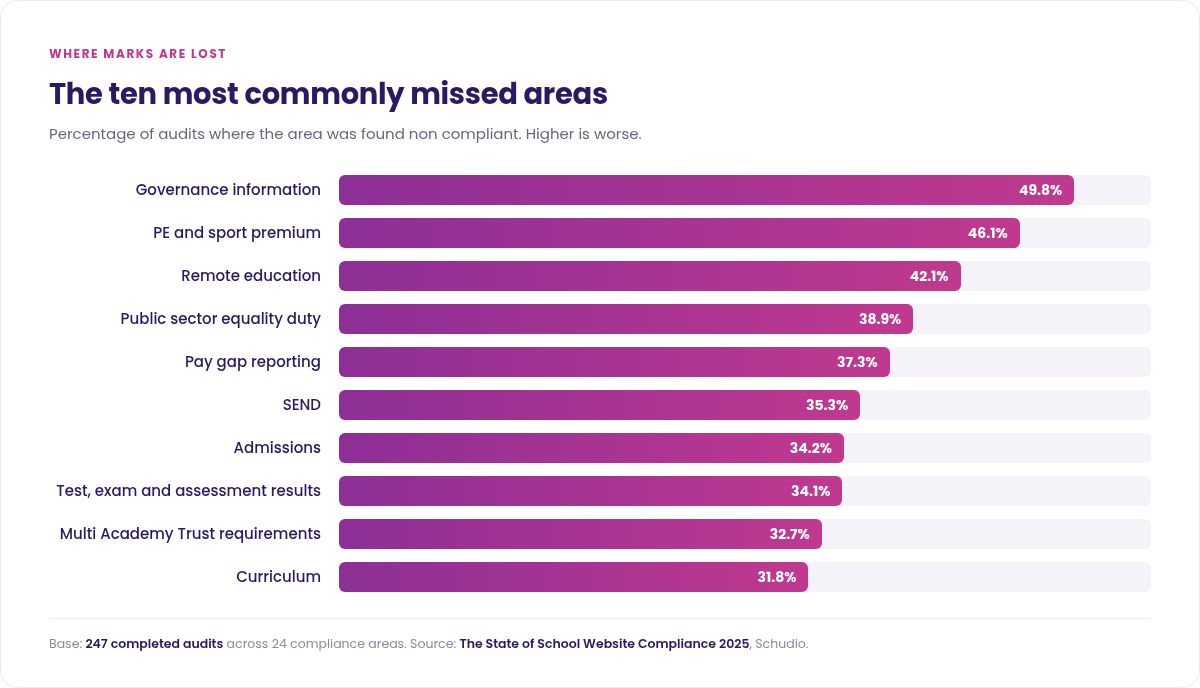
Governors join and leave and nobody sends a reminder, which is why governance information tops this list. Curriculum information runs it close, because subjects and year groups change and the page rarely does. What you must publish is a defined list, longer than most schools expect, and it does not change every year whatever anyone tells you in September.
Accessibility is mostly small jobs, repeated
Every photograph needs a text description, or the information in it is not available to anyone using a screen reader. Untagged PDFs are the most common problem and the easiest to overlook, because the page around them looks fine. Ten minutes moving through your own site with a keyboard and no mouse teaches an office team more than any automated report.
Of these tools, the Accessibility Statement Generator closes the quickest gap: the statement itself is required, and routinely missing.
The everyday admin pages
Unglamorous, heavily used, and usually the pages parents actually came for.
Term dates, contact details and staff lists
Publish term dates as text on a page as well as a document. A PDF of term dates is the most searched for and least accessible thing on a school website. Contact details need an address, a telephone number and the named person who deals with queries, and mainstream primary and secondary schools also need their SENCO. Staff lists want names, roles and a route to reach somebody who can help, not a chart. Check the links while you are there.
Who actually owns your web address
The least glamorous item on the list, and the one that causes the most trouble when nobody in school knows the answer. Nominet never publishes a renewal date for a sch.uk address, so the only way to find out is to ask whoever holds it. School Domain Lookup shows who holds the registration, who you renew with, who runs the website and who runs the email, in plain English.
Checking how the website is doing
You do not need an analytics qualification to know whether a school website is working.
Five pages carry almost all the traffic

Term dates, uniform, admissions, contact details and absence reporting. Everything else is secondary, whatever the homepage says. If those five are quick to find on a phone, most parents will never need anything else.
Read it as a stranger would
Open your admissions page as a parent who has never heard of your school and time how long it takes to work out how to apply. Content ages quietly, and the page nobody has opened in two years is the one an inspector finds.
News and social media
The same picture rarely suits a website news item and a social post, and sizing both at once saves doing it twice.
One photograph, every shape you need
Sizing for the website and the social accounts in one pass keeps the school consistent across the places parents see it, and stops one photograph appearing cropped three different ways in a week.
Banners, previews and the safe area
When somebody shares one of your pages in a message, a preview image is pulled from that page. If none is set, the platform picks something for you, and it is usually your logo on a white square.
If you look after several schools
Trust central teams support several schools at once, and each of them does things a slightly different way.
Set the sizes and the standards once
Agreeing image dimensions and a house style across a trust settles an argument that otherwise repeats in every school. All of these tools are free and need no install, so a central team can send them round without a licence or a training day.
The same jobs, multiplied
Reading age, accessibility statements and Word formatting are identical problems in every primary and secondary school in the trust, usually solved by whoever happens to be free. Pooling the approach is quicker than pooling the work.
Common questions
Are they really free?
Yes. No account, no sign-up, no watermark and no limit. Nothing you put into these tools is uploaded or seen by us, because every one of them runs in your own browser.
Do they only work with a Schudio website?
No. They work with any school website. The image resizer includes the exact pixel sizes the Schudio system uses, which is handy if you are with us and harmless if you are not.
Can we share them with other schools?
Please do. Trust central teams are welcome to send these resources round to help their schools, and there is nothing to license or install.
Why give these away?
We build and support school websites across education for a living. These are the jobs we could hand over without a meeting. If they save you an afternoon and you never speak to us, that is a fine outcome.
What if we need to know where we actually stand?
That needs somebody to look at your website, which is what an audit is for. These tools tell you how to do the job. They cannot tell you whether your site meets the requirements today, and no free tool can.