What Schools Should Not Use AI For: The AI Safeguarding Risks Leaders Need to Know
What Schools Should Not Use AI For: The AI Safeguarding Risks Leaders Need to Know
Most talk about artificial intelligence in schools is about what it can do. This post covers the other half, which matters just as much to a headteacher, designated safeguarding lead or trust leader: what schools should not use AI for, and the AI safeguarding risks behind those limits.
We’re not anti AI. We build AI tools into our own school website platform, and they save staff real time. But years of helping schools keep their websites compliant have shown us how quickly a helpful tool becomes a problem when it’s pointed at the wrong job. With gen AI, the wrong job usually involves children, personal data, or a fact that has to be right.
The Short Answer: What Schools Should Not Use AI For
Here’s the short version. Schools should not use generative AI to:
- Make safeguarding decisions, handle disclosures, or write child protection records.
- Process pupils’ personal data in any AI tool your school hasn’t approved and checked with your data protection officer.
- Write or interpret statutory policy without a person who knows the current law checking every line.
- Edit or generate images from real pupils’ photos, or present AI images as real events.
- Publish factual information such as term dates, admissions criteria or SEND arrangements without checking it against the source.
- Run pupil-facing chatbots without supervision, filtering and monitoring.
- Stand in for pastoral support or wellbeing conversations with children.
None of these are banned outright by law. They’re judgement calls, but each maps to a real risk the Department for Education (DfE), Ofsted and the latest safeguarding guidance have flagged. In every case the safest answer is the same: keep a person in charge.
What Keeping Children Safe in Education 2026 Now Says About AI
This is the part many schools haven’t caught up with yet. Keeping children safe in education 2026 (KCSIE), the statutory guidance that applies from September 2026, now talks about AI directly in its online safety section.
The four areas of online safety risk now name AI
KCSIE has long grouped online safety risks into four areas: content, contact, conduct and commerce. In the 2026 edition (paragraph 165), two of those now mention AI by name:
- Contact covers harmful online interaction with other users “or generative AI applications that simulate this”.
- Conduct covers making, sending and receiving explicit images, “including those generated using AI”.
New paragraphs on generative AI
Paragraphs 167 and 168 are new. They point schools to the DfE’s Generative artificial intelligence (AI) in education policy paper for the safety considerations and legal responsibilities of using gen AI, whether it’s teacher facing or pupil facing. They also point to the free online resources the DfE developed in partnership with the Chiltern Learning Trust and the Chartered College of Teaching. Module 3 covers the key risks around safeguarding, ethics, data protection and intellectual property.
KCSIE 2026 also now talks about nudes and semi-nudes “including where generated by AI”, such as deepfakes, and signposts guidance from the National Crime Agency’s CEOP Education programme and the Internet Watch Foundation on understanding and responding to AI generated child sexual abuse material.
Filtering and monitoring reviews every academic year
The other change worth knowing about is in paragraph 173. Governing bodies and proprietors should make sure a review of filtering and monitoring effectiveness is carried out at least once every academic year. The review should be led by the senior leader responsible for filtering and monitoring, with support from the DSL and IT support, it should check that filtering works on all internet-connected devices in all relevant locations, and a record should be kept.
The wording already sat in the filtering and monitoring standards, but statutory guidance makes it harder to overlook.
That matters because the DfE’s Generative AI: product safety standards, first published in January 2025 and updated in January 2026, expect AI products used in education to filter harmful content, log activity and alert the school’s safeguarding lead. Your filtering review should include the AI tools pupils can reach.
Why AI Risks Are Different, and Harder to Protect Children From
What’s different about gen AI is speed, scale and realism. The numbers show a rapid increase.
The scale of harmful AI generated images
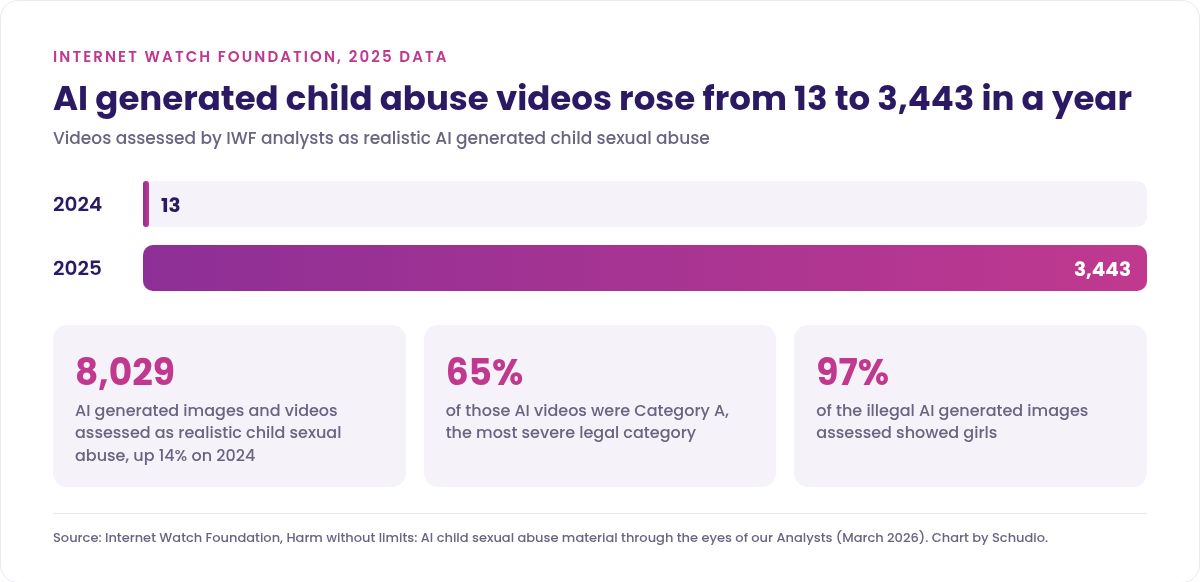
The Internet Watch Foundation (IWF), the UK charity that removes child abuse imagery online, published its latest AI report in March 2026. Its analysts assessed 8,029 AI generated images and videos as showing realistic child sexual abuse during 2025, a 14% rise on the year before. Video was the biggest jump: 3,443 AI generated child sexual abuse videos in 2025, compared with just 13 in 2024. Of those videos, 65% were in Category A, the most severe legal category, and 97% of the illegal AI generated images it assessed showed girls.
Computer generated images of real children and young people can now be produced from a handful of ordinary photos, which changes how schools think about the pictures they publish and the AI tools they allow.
The law is catching up
Making, possessing or sharing abuse imagery of children, including AI generated imagery, has long been illegal in the UK under the Protection of Children Act 1978. The Crime and Policing Act 2026, which received Royal Assent on 29 April 2026, goes further:
- Nudification tools. Section 99 makes it an offence to make, adapt or supply a tool for generating purported intimate images of a person. This has been in force since 29 June 2026.
- Child sexual abuse image-generators. Section 72 creates an offence of making, adapting, possessing or supplying something designed to create child sexual abuse images. At the time of writing this section is in the Act but not yet in force; it will be brought in by regulations.
Seven Things Schools Should Not Use AI For
Now the detail. For each one we’ve explained the risks, and what school staff can do instead.
1. Safeguarding decisions, disclosures and child protection records
This is the clearest line of all. AI should never decide whether something is one of your safeguarding concerns, never summarise a disclosure on your behalf, and never draft a record from rough notes.
There are three reasons. First, the judgement belongs to trained people: KCSIE is built around staff reporting concerns to the DSL, and nothing hands that to a tool. Second, the data is some of the most sensitive a school holds, and pasting it into a general AI tool is a data protection breach waiting to happen. Third, AI summarises by smoothing things out, and in safeguarding practice the small odd detail is often the one that matters.
Instead: keep safeguarding recording in your approved system, written by the person who heard the concern, and never put information about a real child into an AI tool.
2. Pupils’ personal data in unapproved AI tools
The DfE’s advice on generative AI and data protection in schools is direct. If staff want to enter pupils’ personal data into an AI tool, they should check with the data protection officer first, and the school has to make sure that data is protected and not used to train the AI. It also warns that some AI platforms collect extra information such as location, IP address and browser details, and that data in the wrong hands is a breach.
The everyday version is a teacher pasting report comments, an EHCP extract or a behaviour log into a free chatbot to “tidy it up”. It feels harmless, and it’s often the riskiest thing happening with gen AI in a school.
Instead: publish a short list of approved AI technologies, say what each may and may not be used for, and make “no pupil names or identifiable details in unapproved tools” a rule every member of staff knows.
3. Writing or interpreting statutory policy
Artificial intelligence is confident. That’s the problem with using it for policy. It will happily draft a safeguarding policy, an online safety policy or an allergy policy that reads well and is quietly out of date.
A real example: the duty to publish an allergy safety policy on your website came into force on 1 September 2026, but the DfE’s allergy guidance, published seven weeks earlier, still says the government “intends to introduce” it. An AI model reading that guidance would tell you the duty isn’t in force, and sound certain. We’ve written about the detail in our post on what the allergy law means for your school website.
Instead: use AI, if at all, to check the readability of a policy a person has written, then have the named policy owner confirm every legal statement against its source. Our Always Ready compliance checklist sets that routine out.
4. AI edits of real pupils’ photos
This one’s about real children. Never put a real pupil’s photo into an AI tool to edit it, restyle it or “improve” it, and never use one as the starting point for a new image. Even a well meant edit, like removing a background or tidying a class photo, creates a manipulated image of a child that they and their parents and carers didn’t agree to. Uploading the photo is also a data protection question for your DPO, and once a third party tool has it, you can’t be sure where it’s gone.
Wholly AI generated images of children are a different matter, and they can actually reduce risk. The Home Office has warned that offenders train AI models on “the likeness of a specific child”. A child who doesn’t exist can’t be traced back to one of your pupils, and every generated image you use in place of an identifiable photo is one less real child’s face on your website. So we’re comfortable with schools using AI generated images of children in their own setting, uniform and all, on the right terms:
- Wholly generated. Made from a written description, never from or based on a real pupil’s photo.
- Labelled honestly. Use them for general pages, banners and themes, not to show a real event, a real class or a named pupil’s achievement. A short “illustrative image” caption is enough.
- From a licensed tool. The DfE warns about “secondary infringement” when AI output built on unlicensed material is published, and gives a school website as its example. Use a tool your school is licensed to use commercially.
- Checked before it goes up. Look at every image. AI still gets hands, faces and uniforms wrong.
- Written into your image policy. Say when AI images are used and who signs them off, so staff and parents know where you stand.
Real photography still matters. Parents want to see your staff, classrooms and pupils’ work, and photos of activity taken from behind or at a distance carry that without identifying anyone. We’ve covered that side in school website pupil photos, AI risks and child protection, and a follow up post later this month looks at AI and school photography.
Instead: keep real pupils’ photos out of AI tools entirely, and use wholly generated images where you’d otherwise need an identifiable child.
5. Publishing facts without checking them
Term dates, admissions criteria, SEND arrangements, contact details. These are the facts parents act on, and several sit in the DfE’s list of what schools must publish online.
Gen AI makes things up, and for a parent that’s simply wrong information on an official school page. The DfE’s advice is plain: fact-check results to make sure the information is accurate.
Instead: let AI help with tone, structure and plain English, then check every fact against the original source before it goes live. A named person should sign off anything factual. We explain how that review step works in practice in how AI can save time on school newsletters and website content.
6. Unsupervised, unfiltered pupil-facing chatbots
The DfE’s policy paper says pupils should only use generative AI in education settings with appropriate safeguards in place, such as close supervision and tools with safety, filtering and monitoring features. It also says schools should comply with the age restrictions set by AI tools.
Many popular AI platforms set a minimum age of 13 or older, and a general chatbot outside your filtering, with no logging, is exactly what KCSIE’s new “contact” wording is worried about.
Instead: if pupils use AI, use tools that meet the DfE’s product safety standards: built in filtering, activity logs, alerts to your DSL, and clear age suitability. Include those tools in your annual filtering and monitoring review.
7. Pastoral support and wellbeing conversations
The consultation behind KCSIE 2026 recorded practitioners’ concerns about “the inappropriate use of AI as a substitute for pastoral support”. It’s a fair worry. A chatbot is available at 2am, never gets tired and always replies. For a lonely or anxious young person that can feel like support, and it isn’t. It’s one of the more serious risks because it’s so quiet.
AI doesn’t know the child, can’t spot a pattern across weeks, and can’t phone a parent or refer to other agencies. The product safety standards even ask suppliers to spot possible safeguarding disclosures and alert the school.
Instead: keep pastoral care human. If a pupil mentions they’ve been talking to a chatbot about how they feel, treat it as a conversation worth having, not a technology issue.
The AI Risks Pupils Face Outside School
Much of the online harm linked to AI happens away from school systems, on phones and apps at home. Schools still see the fallout, and KCSIE expects a whole school approach to online safety that includes parents and carers. These are the AI risks your DSL is most likely to meet.
Deepfakes, nude images and manipulated images
Nudification apps can turn an ordinary photo from social media into a fake explicit image in seconds. These incidents often start between pupils and cause serious distress. KCSIE treats AI generated nudes of under 18s in the same way as real ones, and making or sharing them is a criminal offence. It’s worth making sure students know that.
Sextortion and online grooming
Criminals use AI to create fake profiles, write convincing messages and produce fake images to coerce or blackmail young people, a form of exploitation that includes financially motivated sexual extortion. The message pupils need is simple: if it happens, it’s not your fault, tell an adult, and don’t pay.
Misinformation and online scams
Gen AI makes misinformation cheaper and online scams more believable, from fake voice notes to realistic phishing emails aimed at school staff. Digital literacy, teaching learners to question what they see, is one of the best protections a school can offer.
How to Respond to an AI Image Incident
When an AI generated or manipulated image of a pupil turns up, the steps are the same as any other nudes or semi-nudes incident. Staff should:
- Treat it as a safeguarding concern and report it to the DSL straight away, even if it’s “only AI”.
- Not view, copy, download, forward or print the image. Staff shouldn’t ask pupils to show or send it either.
- Follow your safeguarding policy and the resources KCSIE signposts, including the CEOP Education and IWF guidance on AI generated abuse material.
- Support the young person affected, who may be deeply distressed even though the image is fake.
- Know how to get content removed. Childline and the IWF run Report Remove, which helps under 18s report nude images of themselves so they can be taken down.
- Involve other agencies where needed, including the police if a crime may have been committed.
What Your School Website Should Say About AI
This is where our day job comes in. Parents and carers, inspectors and the wider school community look at your website to see how your school works, so a few AI points belong there.
Your privacy notice
The DfE’s data protection guidance says schools must include how any data is collected, processed and stored by generative AI tools in the school’s privacy notice. If staff use AI technologies that process personal data, your published privacy notice should say so. It’s an easy one to miss.
Your online safety information for parents
Most schools already have an online safety page. Add a short, calm section on AI for parents and carers: the risks of nudification apps and deepfakes, what to do if something happens, and where to get more support. Link to reputable resources from organisations such as the UK Safer Internet Centre rather than trying to cover every app.
Your policies
KCSIE expects online safety to run through all relevant policies, including child protection. Many schools now add a short AI section, or an acceptable use statement covering staff and pupil use of AI. Make sure the published version is the current one. Our School Website Requirements guide sets out what must be published, and it’s a free download.
Where AI Does Help, Safely
None of this means AI is too risky to touch. Used for the right jobs, with a person checking the output, it takes real work off busy staff: drafting newsletters from your own notes, spotting gaps on a website and answering parents’ routine questions from your own pages.
That’s how we’ve built our own tools. Our pillar guide to AI school website software explains what those tools actually do, what they deliberately don’t do, and what happens to school data. For everyday classroom and office uses, see our guide to practical ways schools can use AI safely.
Ofsted’s position helps too. In its advice on how it looks at AI during inspection, Ofsted says it doesn’t directly evaluate the use of AI or any AI tool, and doesn’t expect schools to use AI at all. What inspectors may look at is the decision making: what risks leaders considered, such as data protection, safeguarding, bias and other ethical considerations, and the impact on children.
A Practical AI Safeguarding Checklist for Schools
Take this to your next leadership or safeguarding meeting, then review it each year alongside your filtering and monitoring review.
Leadership and policy
- A named senior leader owns AI use across the school or trust.
- Your safeguarding and online safety policies mention AI, including AI generated images and chatbots.
- There’s a written list of approved AI tools and what each may be used for.
- Governors or trustees have had a short briefing on AI risks and the KCSIE 2026 changes.
Data protection
- Your DPO has reviewed every AI tool that could touch personal data.
- Staff know never to put pupil names or identifiable details into unapproved tools.
- Your published privacy notice explains any use of generative AI tools with personal data.
Filtering, monitoring and pupil use
- This year’s filtering and monitoring review includes AI tools and chatbots pupils can reach, on all devices and in all locations, and a record is kept.
- Any pupil-facing AI tool meets the DfE’s product safety standards and age restrictions.
- Pupils and students are taught about deepfakes, sextortion and misinformation as part of online safety and RSHE, so they understand the harm and know who to tell.
Staff and training
- Staff training builds awareness of AI generated images and how to respond without viewing or sharing them.
- Staff know the seven things the school does not use AI for.
- Every adult in school knows how to report concerns to the DSL.
Website and communication
- Your online safety page gives parents and carers clear, calm AI advice.
- Every factual page (dates, admissions, SEND) has a named person who checks it.
- Your image policy says real pupils’ photos never go into AI tools, and sets out when generated images are used, how they’re labelled and who signs them off.
Common Mistakes to Avoid
Treating AI as an IT issue
AI risks sit with safeguarding and leadership, not just the IT team. KCSIE puts the filtering review with the senior leader responsible, supported by the DSL and IT, for a reason. A whole school problem needs a whole school response.
Banning it and assuming that’s the end of it
A blanket ban without education doesn’t stop pupils or staff using AI on their own devices. The DfE’s policy paper points out that there may be uses that haven’t been approved. Clear rules plus teaching students how to engage safely beats a ban nobody follows.
Trusting confident answers about the law
If an AI model tells you what the law requires, check the primary source. Tools lag behind commencement regulations and updated guidance, and they rarely say when they’re unsure.
Forgetting the website
Schools update internal policies and forget the public version. An out of date child protection policy on your website is a compliance problem and a trust problem.
Shaming the child
When a pupil is the victim of a deepfake, blame has no place in the response. Victims often feel responsible for something they had no part in, so say clearly that it’s not their fault.

Frequently Asked Questions
What are the main AI risks for schools?
The main safeguarding risks are AI generated sexual images and deepfakes of pupils, sextortion and grooming using fake profiles, harmful chatbot interactions, misinformation, and staff putting pupils’ personal data into unapproved AI tools. KCSIE 2026 now names generative AI in its online safety risk categories.
Does KCSIE 2026 mention artificial intelligence?
Yes. KCSIE 2026 adds generative AI to the contact and conduct areas of online safety risk, includes new paragraphs pointing to the DfE’s generative AI policy paper and support materials, covers AI generated nudes and deepfakes, and signposts the DfE’s product safety standards for AI in its filtering and monitoring section.
Can teachers use ChatGPT or other AI tools with pupil data?
Only if the school has approved the tool and the data protection officer has confirmed it’s safe, including that the data won’t be used to train the AI. The safest everyday rule is no pupil names or identifiable details in any unapproved AI tool.
Is it illegal to create sexual AI images of children?
Creating, possessing or sharing AI generated abuse imagery of children is illegal in the UK. Since 29 June 2026, making or supplying nudification tools has also been an offence under the Crime and Policing Act 2026. A further offence covering AI models built to create such images is in the Act but not yet in force.
Can schools use AI generated images of children on their website?
Yes, if they’re wholly generated and never based on a real pupil’s photo. Used in place of identifiable photos, they mean fewer real children’s images online that could be misused. Label them as illustrative, use a properly licensed tool, check each one before it’s published, and set out your approach in your image policy.
Does Ofsted inspect how schools use AI?
Ofsted says it doesn’t directly evaluate the use of AI or any AI tool, and doesn’t expect schools to use AI. Inspectors may consider the impact of AI use on children and ask what risks leaders considered, such as safeguarding, data protection and bias.
Should schools have an AI policy?
There’s no specific legal requirement for a standalone AI policy. But KCSIE expects online safety to be reflected in all relevant policies, and the DfE suggests schools consider guidance on acceptable AI use. Many schools add an AI section to existing policies or publish a short acceptable use statement.
What should staff do if they find an AI generated image of a pupil?
Report it to the DSL straight away and follow the school’s safeguarding procedures. Don’t view, copy, download, forward or print it, and don’t ask anyone to send it to you. Support the pupil affected and make sure they know it’s not their fault.
Keep a Person in Charge
If there’s one idea to take from this post, it’s that gen AI is a tool for drafting, formatting and finding, never for deciding. The moment a job involves a child’s safety, a child’s data or a fact that parents will act on, a person needs to be in charge of it.
That’s the same calm, year round approach we take to website compliance: a routine that keeps you ready, not panic when inspection is announced. If you’d like help with the compliance side, our free School Website Requirements guide is the place to start, and our free monthly School Website Requirements workshop walks through what needs to be on your website and how to keep it current.

Related Posts
Ian Richardson
July 29, 2026
What parents look for in a school, and how your website answers it before they visit: culture, safeguarding, SEND support and clear practical information.
Ian Richardson
June 24, 2026
A school website says a lot before a parent reads a full page. Parents make ..
Luke Smith
June 24, 2026
School website news is one of the easiest ways to show parents, pupils and prospective ..

Luke Smith
June 17, 2026
A school website newsletter is one of the simplest ways to keep parents informed, make ..
Luke Smith
June 8, 2026
Good school communication makes a real difference. It helps parents know what is happening. It ..

Luke Smith
May 13, 2026
School website pupil photos have always played an important role. They help prospective parents see ..