New Feature: Image Editor
New Feature: Image Editor
Photos and images are one of the most important components of your school website. The Schudio School Website CMS already has powerful file management solutions and image compression options built in and we have just taken the system to the next level.
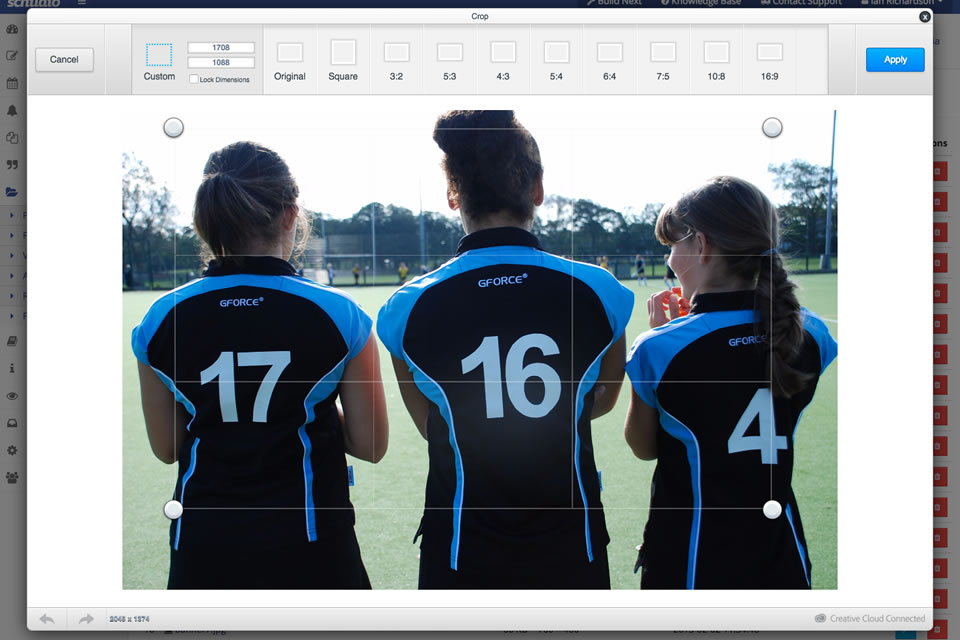
We have integrated a brilliant piece of software that offers a wide range of image editor options directly in our cms. Now you can crop, resize, rotate and utilise lots of other useful and exciting creative tools without the need for any additional on or offline products.
Exciting Features
Crop, Resize & Rotate
Quickly reframe, resize and rotate any photo on your website with our intuitive tools and preset image cropping options.
Enhance
Choose from three preset enhancement options to improve photos with one click. ‘Hi-Def’ intelligently sharpens and defines; ‘Illuminate’ automatically fixes poor lighting issues; and ‘Color Fix’ performs oustanding colour correction.
Effects
Quickly achieve professional results with a great collection of over 100 photo effects, designed to easily enhance everyday photography.
Frames & Stickers
Enhance your creativity with stunning graphics, word art, embellishments, frames and more.
Adjustments
Modify brightness, contrast, saturation, warmth and sharpness with our handy and easy to use adjust tool.
Draw & Text
Mark up or sketch on your photos before sharing them with our intuitive Draw and Text tools. Preset colours help you make your point, fast.
Cosmetic Tools
Remove red eye, whiten teeth, and magically remove blemishes with our convenient set of cosmetic tools.
Ben has written a detailed tutorial on how to use this new tool and our upcoming training sessions are a great place to learn more. To get started you’ll find the image editor in Media >> File Manager, just find the image you want to edit and click the blue edit button.
Let us know how you get on by having a play and tweeting us examples of your work, we’ll share every one you send us.

Related Posts
Ian Richardson
October 26, 2026
PDFs are disappearing from school websites. Here's what the school website accessibility rules say, why phones changed everything and how to move on calmly.

Ian Richardson
October 20, 2026
What should a school website look like in 2027? The school website trends that matter for UK schools and trusts, with a practical checklist and an FAQ.

Ian Richardson
October 13, 2026
AI-generated school content saves time, but accuracy, tone and safeguarding still need a person. What DfE guidance says, who reviews what, and a checklist.

Ian Richardson
October 7, 2026
What a school website chatbot should answer, what it should never answer, and how to get your pages ready before you switch one on. A guide for leaders.

Ian Richardson
September 30, 2026
What schools should not use AI for, the AI safeguarding risks behind each limit, what KCSIE 2026 now says, and a practical checklist for school leaders.
Ian Richardson
September 16, 2026
Introducing the Schudio AI Suite: AI school website software that checks what you publish, drafts pages in your school's voice and answers parents' questions.