School Website CMS Training: Introducing the Schudio Training Dashboard
School Website CMS Training: Introducing the Schudio Training Dashboard
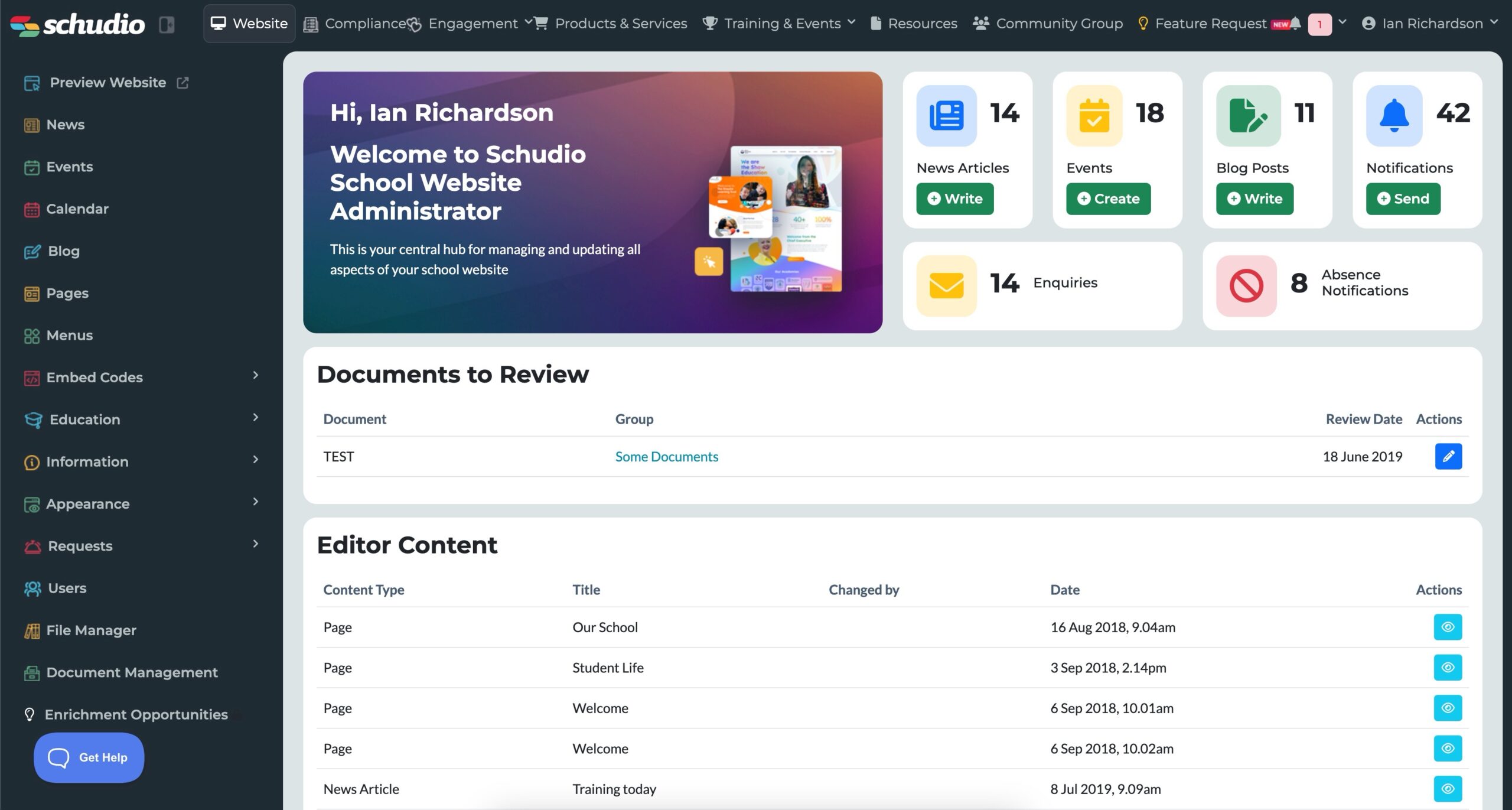
The short version: every Schudio school now has a Training Dashboard inside the CMS. It shows each member of staff the training they’ve done on the Schudio CMS, the level they’ve reached, how they and their school compare with other Schudio schools, and exactly what’s available to them next. You’ll find it under Training & Events > My Training Dashboard, and there’s nothing to set up or sign in to.
We built it because training was the one part of looking after a school website that nobody could see. You could see your pages, your news, your documents and your events. You couldn’t see whether the people managing them were confident, out of date, or had never been trained at all. Now you can.
This post walks through what the dashboard shows, why we count training the way we do, how school leaders can use it, and how to turn a busy term into a sensible, year round rhythm of training rather than a panic before an inspection.
What the Training Dashboard shows you at a glance
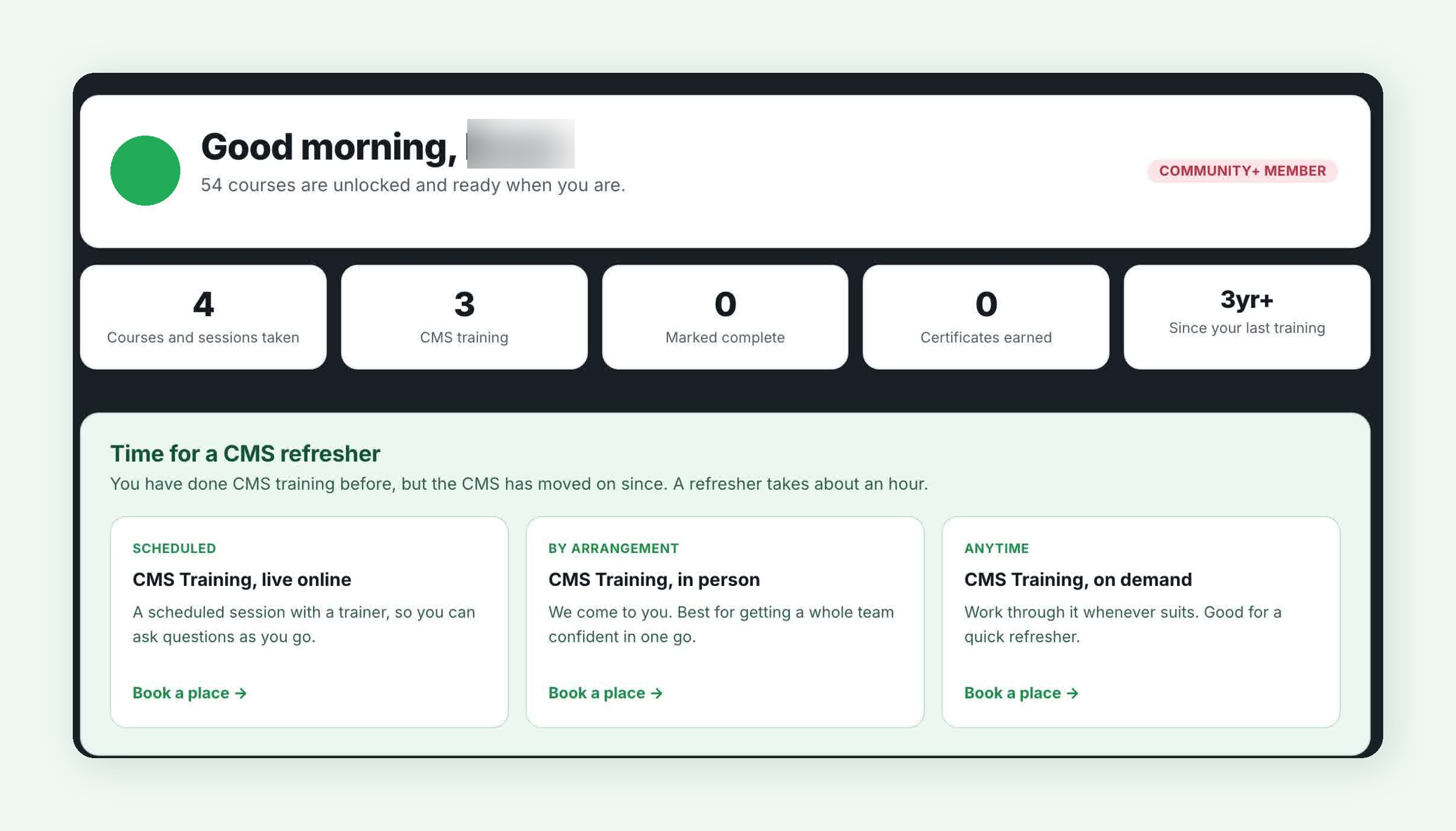
Open the dashboard and the first thing you see is a short, personal summary. Five numbers tell you where you are:
- Courses and sessions taken, everything you’ve chosen to train on with Schudio.
- CMS sessions, the live online, in person and on demand sessions on the Schudio content management system itself.
- Marked complete, online courses you’ve worked through to the end.
- Certificates earned.
- Time since your last training, which matters more than most people think (more on that below).
Below that, the dashboard tells you your level, your learning points, the badges you’ve earned, how you rank among Schudio learners, how many people at your school are training, where your school sits on the school leaderboard, which courses are already unlocked for you, the live sessions you can book, the courses you haven’t tried yet, what’s happening in the Schudio community, and a full history of everything you’ve booked or worked through.
It’s built for the person who actually updates the school website, whether that’s a school business manager, an office manager, a teacher with a website responsibility, or a communications lead in a trust. It’s also built for the headteacher or trust leader who wants to know, honestly, whether the team looking after the website has the support it needs.
Why school website CMS training needed its own dashboard
Most schools don’t have a web team. The school website is usually looked after by one or two members of school staff fitting it around a day job, and the person who was trained when the site launched has often moved role or moved on. When that happens, the knowledge goes with them.
When we pulled the numbers together in August 2026 to build this, two things stood out.
Most learners hadn’t trained for over a year
Across SchudioTV, 57.9% of learners had last trained more than 12 months earlier, and the median gap since someone’s last piece of training was 517 days. That’s not a criticism of anyone. It’s what happens in a busy school. But a lot changes in 517 days. The CMS gains new features, the website requirements move, and the shortcuts you learned in your first week get replaced by habits.
“Completed” wasn’t telling the real story
Only 646 of 27,219 course enrolments (about 2.4%) had ever been marked complete. If we’d built a dashboard around completions, almost everyone would have looked like they’d done nothing. That simply isn’t true. Live sessions and in person visits are never “completed” in the online system, because you attend them rather than click through them. So we changed what we count, which brings us neatly to the next section.
How we count training (and why it’s fair)
The headline figure on the dashboard is training taken, not completions. If you’ve booked onto a live online session, had the Schudio team in for an in person session, or started an on demand course, that counts. Completions and certificates are still shown, separately, so nothing is hidden.
A few rules keep the numbers honest:
- Onboarding courses don’t count. Every new school is given a couple of welcome courses automatically. Being given something isn’t the same as choosing to learn, so those are left out of every count.
- All three ways of learning the CMS count equally. Live online, in person and on demand are all real training. Nobody is ranked lower for picking the format that suits their school.
- New courses are picked up automatically. When we add a new CMS course, it starts counting from the night it launches.
- The figures refresh overnight. If you book something today, you’ll see it on the dashboard tomorrow.
Levels: where you’re up to and what’s next
Every learner sits at one of four levels, set from the real spread of training across Schudio schools rather than numbers we plucked out of the air:
- Getting Started. You have an account. The first piece of training is the one that counts.
- Building Confidence. Two or more courses or sessions.
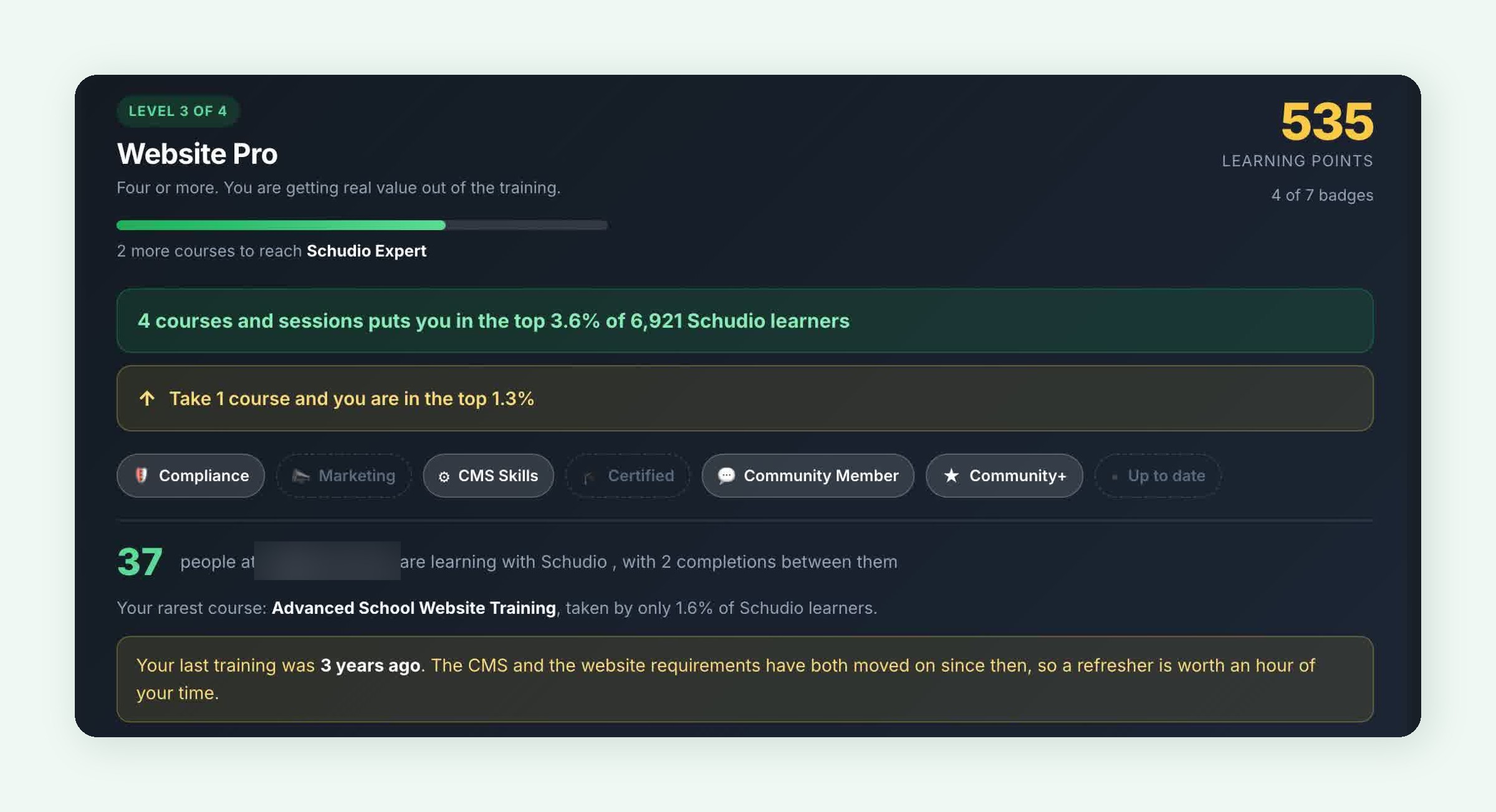
- Website Pro. Four or more. You’re getting real value out of the training.
- Schudio Expert. Six or more. You’re among the most committed learners on SchudioTV.
A progress bar shows how far you are from the next level, with a plain line underneath such as “2 more courses to reach Schudio Expert”. That one line does more than any amount of encouragement, because it turns a vague “I should do some training” into a specific next step.
Learning points
Alongside your level you’ll see a learning points total. Points build up as you take courses and sessions, start courses, train on the CMS and finish courses, so steady effort is rewarded and finishing something is worth a little more. It’s a simple way to see progress between levels.
Badges: seven ways to show what you know
There are seven badges. Earned ones light up, and the ones still to get are shown faintly so you can see what’s left:
- Compliance, for training on website compliance, the requirements, Ofsted, GDPR and statutory information.
- Marketing, for training on marketing, communications, social media and engagement with parents.
- CMS Skills, for any training on the Schudio CMS.
- Certified, for earning at least one course certificate.
- Community Member, for joining the Schudio community.
- Community+, for members of our Community+ membership, which unlocks the full course library.
- Up to date, for anyone who has trained in the last 12 months.
The three subject badges (Compliance, Marketing and CMS Skills) map onto the three things a school website has to do well: meet its legal duties, tell the school’s story to prospective parents and the community, and be kept up to date without it becoming time consuming.
How you compare with other Schudio learners
This is the part people tend to look at first. The dashboard tells you where your training puts you among every active Schudio learner. At the time of writing that’s 6,921 people, so a line such as “4 courses and sessions puts you in the top 3.6% of 6,921 Schudio learners” means something.
Right underneath, there’s a next step nudge, for example “Take 1 course and you are in the top 1.3%”. We tested a lot of wording, and that forward looking line is the most useful thing on the page. It isn’t about competing with colleagues. It’s about seeing that one more hour of training genuinely moves you on.
We only compare against people who are actually learning
The comparison is made against active learners, people with at least one piece of training, not every account that has ever been created. Counting dormant sign ups would make everybody look better than they are, and flattering numbers aren’t useful numbers.
Your rarest course
The dashboard also picks out your rarest course, the one the fewest Schudio learners have taken. It’s a small touch, but it’s a nice reminder that the deeper CMS courses, such as Advanced School Website Training, are taken by a small share of learners and are well worth the time.
Your school, your colleagues and the school leaderboard
Website management works best as a team effort, so the dashboard also looks at your school as a whole.
People at your school who are learning
You’ll see how many people at your school are training with Schudio and how many courses they’ve completed between them. If it’s just you, that’s a useful prompt to share the load. If a website depends on one person, the school is one resignation away from nobody knowing how to update it.
The school leaderboard
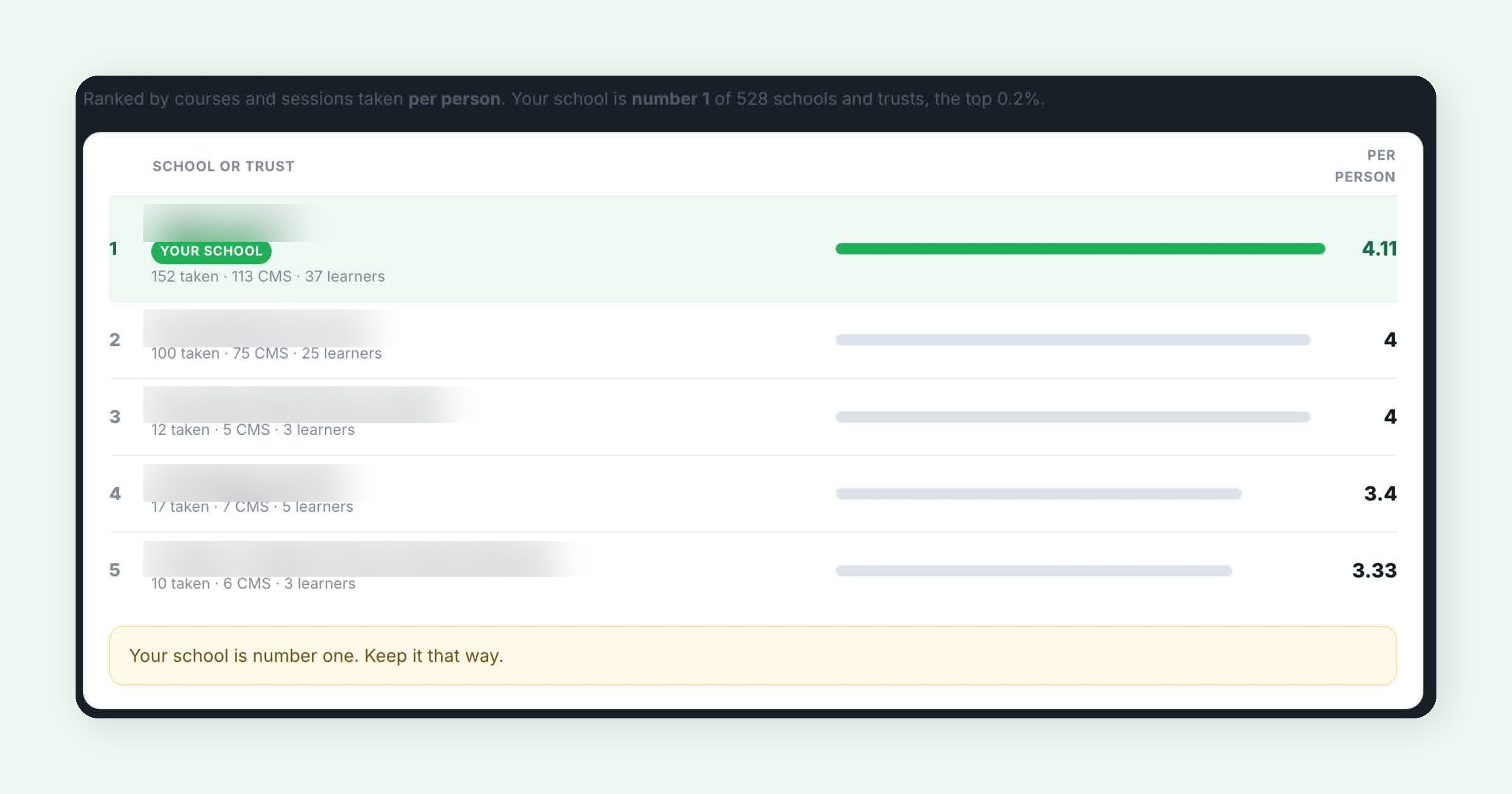
Schools are ranked on training taken per person, not in total. That matters. A big secondary with 40 staff on the CMS would always beat a small primary on raw totals, so we divide by the number of learners to keep it fair. At the time of writing there are 528 schools and trusts on the leaderboard.
Your school’s row is highlighted, and you’ll see the schools around you. If you’re not at the top, the dashboard tells you how much more training your school would need to overtake the school above. If you are at the top, it simply says “Your school is number one. Keep it that way.”
To keep the leaderboard meaningful, a school needs at least three people training before it appears, so one enthusiastic person can’t skew it. Trust wide email domains are left out of the school leaderboard, because a trust isn’t a single school.
What the dashboard never shows
The dashboard never shows another individual’s name or progress. Comparisons are either anonymous (your percentile among all learners) or at school level. Your own detail is yours.
The refresher prompt: keeping training current all year round
If it’s been more than 12 months since your last piece of training, the dashboard says so, plainly. For example: “Your last training was 3 years ago. The CMS and the website requirements have both moved on since then, so a refresher is worth an hour of your time.”
That isn’t scaremongering, it’s just true. Two examples from the last couple of years:
- The CMS keeps improving. Since August 2026, for example, every Schudio CMS account uses two step sign in, with a six digit code emailed to you each time you log in. Small changes like that are easy to miss if you only trained when the site launched.
- The requirements move too. Since 1 September 2026, schools in England must publish their allergy safety policy on their website, under the Children’s Wellbeing and Schools Act 2026 (section 34, brought into force by SI 2026/933). It isn’t yet on the DfE’s own “what schools must publish online” pages, which is exactly why staying current matters.
Alongside the prompt, a “Time for a CMS refresher” panel offers the three ways to do it, and a refresher takes about an hour.
Online training, in person or on demand: three ways to learn the CMS
Every school is different, so the dashboard offers training on the CMS in three formats and counts them all equally:
Live online
A scheduled session with a trainer, so you can ask questions as you go. Ideal if you like to learn with someone and want answers to your school’s specific questions. Book CMS training online.
In person
By arrangement, the Schudio team comes to you. This is the best option for getting a whole team confident in one go, for example when a new office team starts or a trust brings several schools onto the CMS. Arrange in person CMS training.
On demand
Work through it whenever suits. Good for a quick refresher, for a new starter’s first week, or for staff who only update a few individual pages.
Whichever you pick, the training covers the everyday tasks that keep a school website healthy: creating new pages, editing website content, publishing news articles, adding events, uploading documents and keeping menus tidy, all built specifically around the Schudio content management system.
What good training on a content management system (CMS) covers
Many schools choose a content management system (CMS) because it promises school staff full control of their own website without needing developers or technical skills. That promise only holds if the people using it are trained. Even the best CMS for schools is only as good as the confidence of the content editors behind it.
Good training on any content management system (CMS) should be practical, built around the real jobs your team does every week:
Individual pages and structured content
Creating new pages, editing individual pages, using templates and keeping content structured so parents can find things quickly on any screen size.
News, events and images for prospective parents
Publishing news articles, adding events to the calendar and choosing images that show prospective parents what the school is really like. A website that is updated regularly is one of the first things families notice.
Documents, links and menus
Uploading documents such as policies and newsletters, keeping links working and organising menus and sub menus so key pages are never more than a couple of clicks away.
Compliance as part of everyday website updates
Knowing where statutory information lives, so routine website updates keep the site compliant rather than creating gaps.
Schudio’s school website software is designed to be user friendly for exactly this reason, but software is only part of the answer. Across UK schools and the wider education sector, the websites that stay in good shape are the ones where training is treated as ongoing support, not a launch day event. That holds true whichever CMS platforms you compare.
Courses already unlocked for you
The dashboard lists the courses you already have access to, with your progress on each and a button to start or carry on. If you’re a Community+ member, you’ll see that your membership unlocks the wider library of courses, live workshops and coaching sessions, along with a quick link to browse it.
Because the CMS and SchudioTV share one login, you’re already signed in when you click through. There’s no separate username, no password to remember, and no “is this the right account” moment.
Free live workshops and courses you haven’t tried yet
Further down, the dashboard lists live sessions from the Schudio team (free to join, and you keep the recording) and courses you haven’t taken yet. These include:
- the monthly School Website Compliance Workshop, a walkthrough of what your website must publish and what has changed;
- the monthly Marketing Training for Schools and Trusts series;
- The Ofsted Ready Website Day, a full day getting your website inspection ready from start to finish;
- for trusts, the Multi Academy Trust and Academies Website Compliance workshop.
The compliance workshop pairs especially well with learning the CMS. One shows you how to use the system, the other shows you what the website actually needs to say.
The Schudio community
The dashboard also shows the latest conversations in the Schudio community, where over 10,000 people from schools and trusts share what works, ask questions and request features. If you’re stuck on something, the chances are someone has already asked it. You can join the conversation straight from the dashboard.
Your full training history
At the bottom of the page is a complete history of everything you’ve booked or worked through, newest first. Live and in person sessions count from the day you booked, because attendance isn’t recorded online. It’s useful for appraisals, for a new line manager, or simply for remembering when you last did something.
What the evidence says about effective professional learning
We didn’t design the dashboard around points and badges for the sake of it. It’s built around what the evidence says makes professional development stick.
Training works best when it’s sustained over time
The DfE’s Standard for teachers’ professional development (July 2016) says professional development programmes “should be sustained over time” and that it “must be prioritised by school leadership”. Its implementation guidance notes that a one day course on its own, without a specific focus, “is unlikely to have a lasting impact”, and that the most effective programmes typically run for more than two terms.
That’s the thinking behind the refresher prompt and the “Up to date” badge. A one off session when the website launched isn’t enough. A light, regular rhythm is.
Motivation and follow up matter
The Education Endowment Foundation’s Effective Professional Development guidance report (October 2021) identifies 14 mechanisms of effective professional development, grouped into four areas: building knowledge, motivating staff, developing techniques and embedding practice. It’s based on a systematic review and meta analysis of 104 studies. Setting goals, positive reinforcement, monitoring and prompts all feature.
The dashboard’s levels, next step nudges and refresher prompts are exactly that kind of motivation and follow up. The training itself builds the knowledge and techniques. The dashboard keeps it going.
Why this matters for your school website
A confident team keeps a school website accurate, compliant and genuinely useful to parents. An unconfident one avoids the CMS, lets pages drift out of date and leaves everything for a last minute scramble. That drift is where compliance problems come from.
Our State of School Website Compliance 2025 report, based on 247 real audits, found that only 6.5% of school websites were fully compliant, while the average score was 80.2%. Most schools are close. The problem is keeping everything up to date over time, which is a people and process problem as much as a technology one. As we put it in our Always Ready approach to website compliance, being ready all year is calmer, and far less work, than being warned.
Training is how you make that possible. When everyone who touches the website knows how to create pages, publish news, upload documents and update events quickly, keeping the site current stops feeling like a chore.
How school leaders and school staff can use the dashboard
The dashboard is personal, but it’s a useful conversation starter for leaders too. A few practical ideas:
Make it part of induction
When someone new takes on the school website, ask them to open the dashboard in their first week and book their first session. It turns “you’ll pick it up” into a proper start.
Spread the knowledge
Check how many people at your school are training. Aim for at least two people who can confidently update the website, so holidays, sickness and staff changes don’t leave the site frozen. Our older post on who’s the best person to manage your school website is still a good starting point for that conversation.
Use it in appraisal
The training history gives staff a clear record of their professional learning on the website, which is helpful for appraisal and for anyone building their skills in communications or digital.
Plan training into the year
Put a refresher in the calendar each year, for example in the summer term ahead of September, when admissions, term dates and policies all need updating at once.
For multi academy trusts
If you run several schools on Schudio, encourage each school to keep at least one person “Up to date”. Consistent training across schools makes consistent websites much easier, and our websites built for multi academy trusts are designed with exactly that central support in mind.
Your school website training checklist
Use this quick checklist to get the most out of the dashboard this term:
- Open Training & Events > My Training Dashboard in the Schudio CMS.
- Note your level and the “next step” line under your rank.
- Check the date of your last training. If it’s over 12 months, book a refresher.
- Choose live online, in person or on demand sessions, whichever suits your school.
- Book a place on the next free School Website Compliance Workshop.
- Check how many colleagues are training and invite at least one more.
- Look at where your school sits on the leaderboard.
- Pick one course you haven’t tried yet from the unlocked list.
- Join a conversation in the Schudio community.
- Diary a refresher for the same time next year.
Common mistakes to avoid
Treating training as a one off at launch
The most common pattern we see is a burst of training when a new website goes live, then nothing for years. The CMS improves and the requirements change, so the knowledge quietly goes stale.
Relying on a single person
If one person holds all the website knowledge, the school is exposed the moment they’re away or move on. Train at least two.
Only learning the buttons
Knowing how to use the content management system is half the job. Knowing what the website must publish is the other half. Pair your CMS sessions with the compliance workshop.
Waiting for inspection
Last minute training before an Ofsted visit is stressful and rarely sticks. A steady, year round rhythm is calmer and more effective. See our post on an Ofsted ready school website for more on that.
Ignoring the refresher prompt
If the dashboard says it’s been a while, it probably has. An hour now saves far more than an hour later.
Getting started today
If you’re a Schudio school, the dashboard is already waiting for you. Log in to the CMS, open Training & Events, and click My Training Dashboard. If you’ve never trained with us, your first course or session moves you straight from Getting Started towards Building Confidence.
And if you’re not yet a Schudio school, this is a good example of what ongoing support looks like with us. Our school website software comes with training, a community of school staff and a team who want your website to be the best it can be. We’re also building more help directly into the CMS, including the Schudio AI Suite, an optional add-on that helps you create content and check your site, always reviewed by a person.
Frequently asked questions
Where do I find the Training Dashboard?
In the Schudio CMS, go to Training & Events and choose My Training Dashboard. It’s available to every CMS user.
Do I need a separate login for SchudioTV?
No. The CMS and SchudioTV share one sign in, so you’re already logged in when you open a course from the dashboard.
Why does a live session count if I haven’t “completed” it?
Because you attended it. Live and in person sessions are never marked complete online, so we count a booking as training taken. Completions and certificates are still shown separately.
How often does the dashboard update?
Overnight. Anything you book or work through today will appear tomorrow.
Can other people see my progress?
No. The dashboard never shows another individual’s name or progress. Comparisons are anonymous percentiles, or at school level.
How is the school leaderboard worked out?
Schools are ranked on training taken per person, so small and large schools can compete fairly. A school needs at least three people training to appear.
What do the four levels mean?
Getting Started (your first training is next), Building Confidence (two or more courses or sessions), Website Pro (four or more) and Schudio Expert (six or more).
How do I earn the “Up to date” badge?
Take any piece of training within the last 12 months. If it’s longer than that, the dashboard will suggest a refresher.
Which type of training should I choose?
Live online if you want to ask questions as you go, in person if you want to train a whole team together, or on demand if you want to work at your own pace. They all count the same.
Is the compliance workshop free?
Yes. The monthly School Website Compliance Workshop is free to join, and you keep the recording.

Related Posts

Ian Richardson
January 26, 2026
Most schools already have a website. Most schools also have access to analytics. Very few ..

Ian Richardson
October 14, 2025
We’re rolling out a new AI feature in our online learning platform, SchudioTV: the Schudio ..

Ian Richardson
June 15, 2025
Choosing the right school website provider is about more than just the design. It’s ..
Ian Richardson
August 13, 2024
We are thrilled to announce the launch of our newly updated School Website Software (CMS). ..
Ian Richardson
July 30, 2024
There are several features that you may not know about in the Schudio CMS. Part ..
Ian Richardson
October 20, 2023
School websites are the cornerstone of effective communication between schools, parents, students, and the broader ..