
Every school has a story. See the whole picture.
Your schools are different. Keeping track of their websites shouldn’t mean piecing the picture together one site at a time.
The Schudio MAT Portal helps your central team bring that picture together, with real people alongside you when you need them.
Still loading? The film is a large file. Open the MAT Portal film in its own page and let it load there.
A trust is many schools. Its websites should feel like one trust, and still sound like each school.
Each school in your trust has its own site, its own staff and its own way of getting things done. Your central team is still the one asked whether they are all in good order.
Answering that usually means opening site after site, asking around, and hoping nothing has been missed. The MAT Portal gives your trust team a single place to look across the schools, so the conversation can start from what is actually there.
It sits alongside the websites we build and look after for trusts, and alongside the people who do it. You can see the whole picture, and you can pick up the phone when you want a hand with it.
We have built and looked after school and trust websites since 2011, so the people you talk to know the sector.
Step inside the control room.
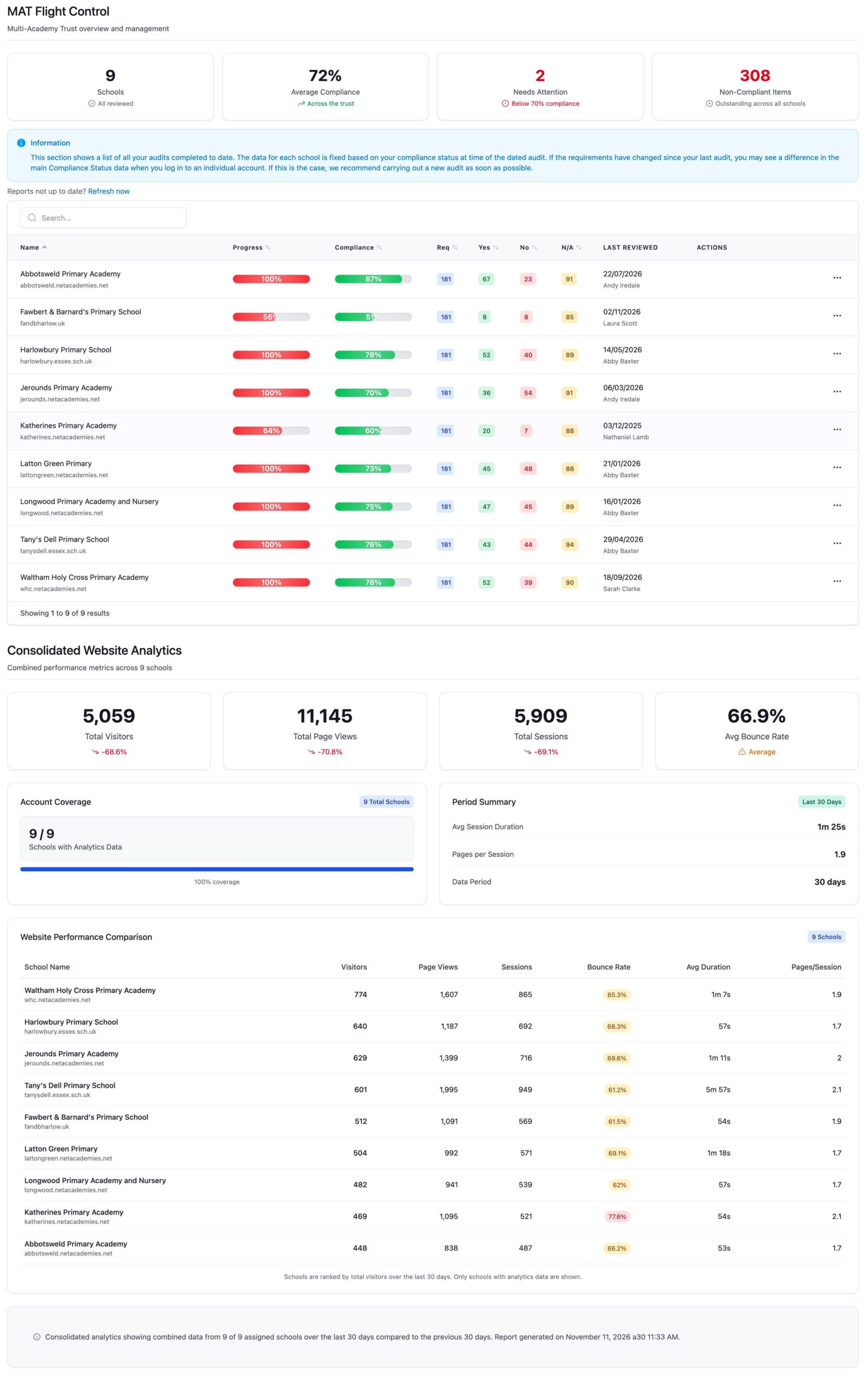
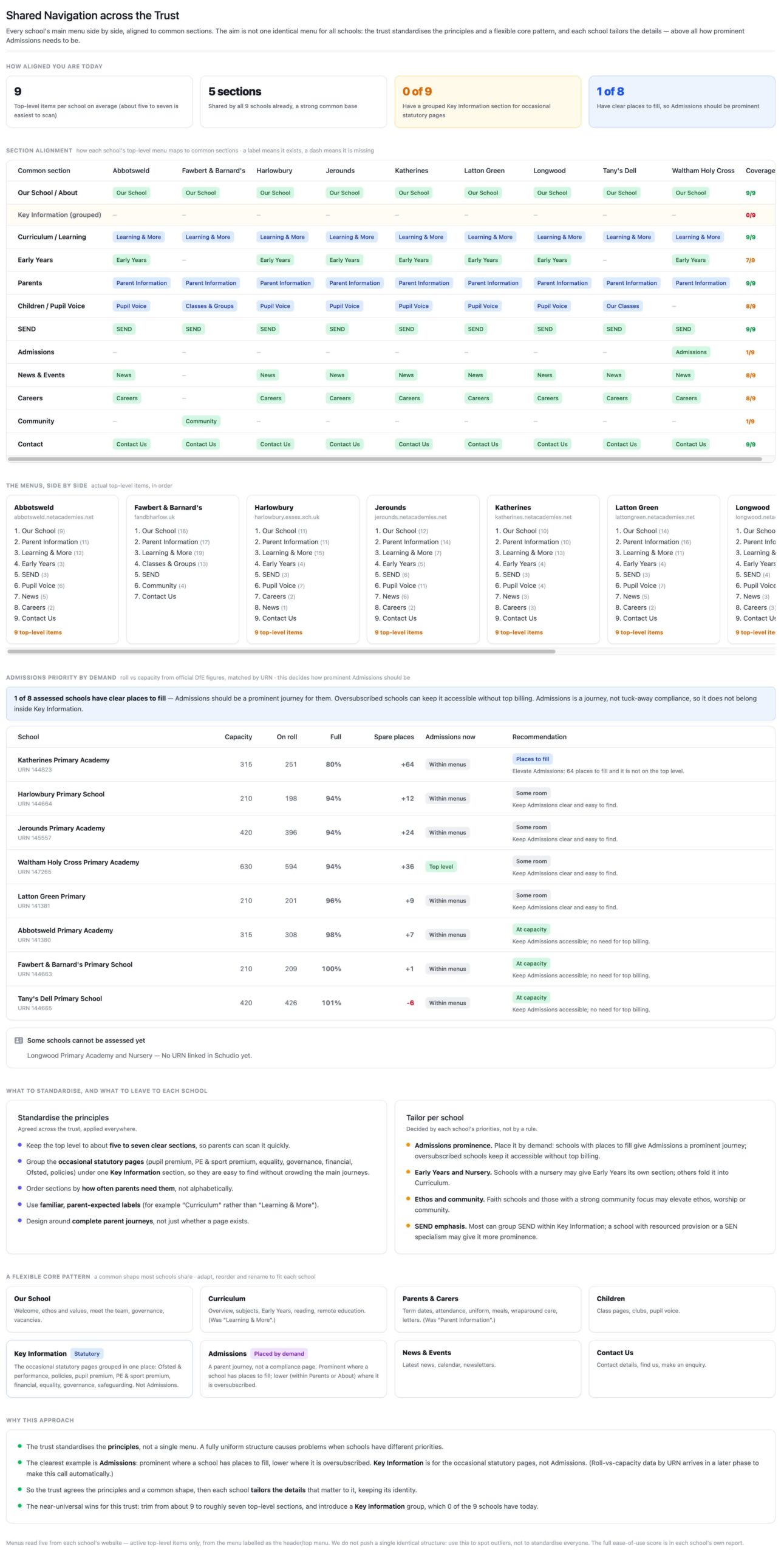
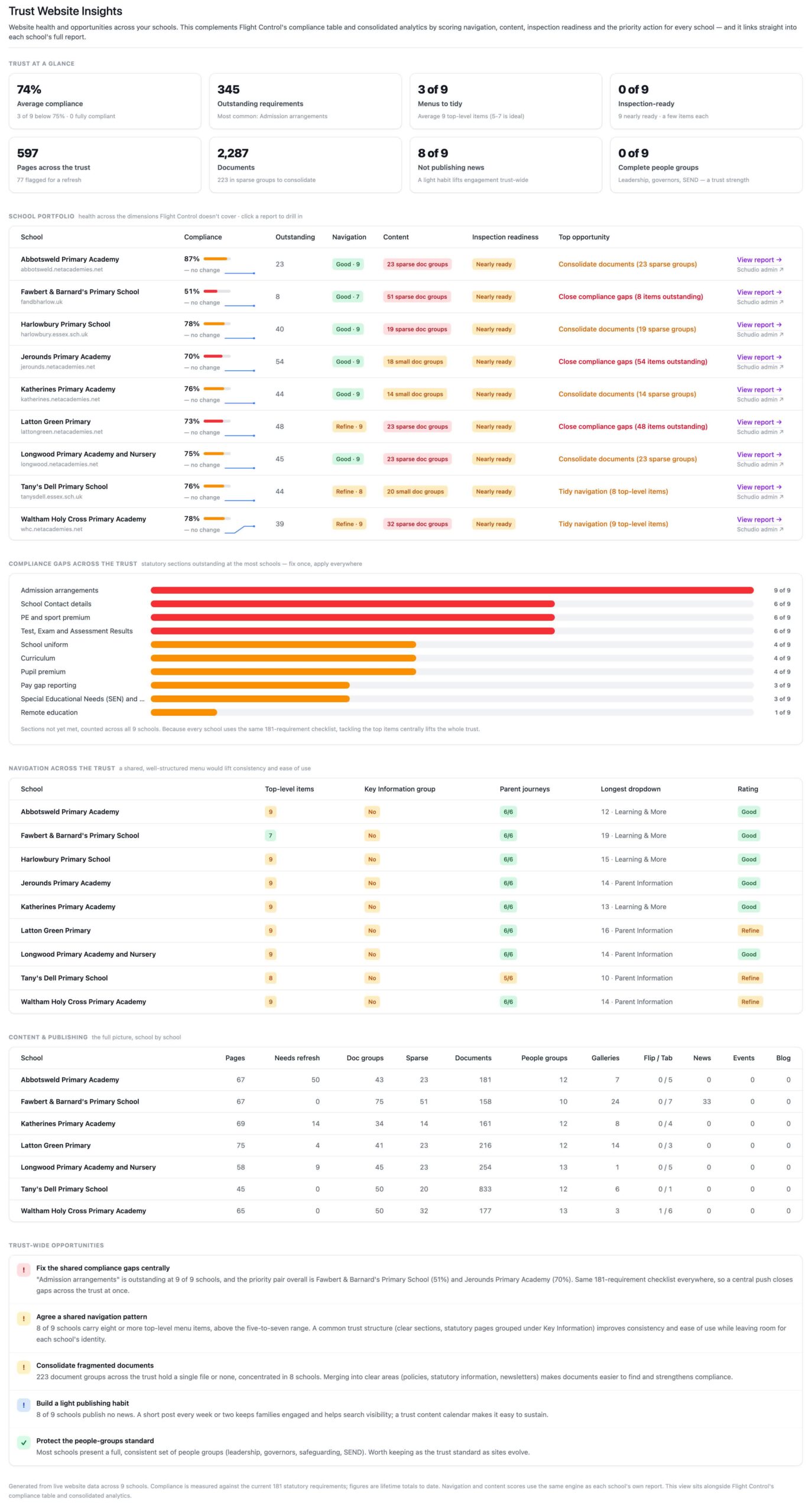
These are real MAT Portal screens. The figures on them belong to the schools shown and are not a Schudio-wide result.
One overview of compliance across every school
The Schools view, called Flight Control, brings your trust’s schools into one place. Your central team can see where school websites stand against what schools are expected to publish, without opening site after site.
It shows you where to look. Putting things right is careful work, and our team does it alongside yours.
Flight Control and analytics
Hover over the screen to look closer.
Shared navigation, with room for each school
A trust’s websites should be easy to find your way around, and schools are not identical. Shared Navigation gives your central team a view of the navigation principles across the trust, so you can agree what stays consistent while each school keeps what makes it its own.
Shared Navigation
Hover over the screen to look closer.
Insights into the health of your websites
Trust Insights gives your leadership team something clear to take into a meeting, and a sensible place to begin a conversation with a school, rather than a pile of pages to check by hand.
What you would see are your own schools.
Trust Insights
Hover over the screen to look closer.
See it with your own schools in it.
Talk to our trust teamOne place to look, and people to talk it through with.
Trust-wide visibility
See your schools together, from one central view, instead of rebuilding the picture from each school’s site. Your trust team starts every conversation from the same page.
School website compliance
Schools are expected to publish the right information, and the requirements keep moving. The Portal helps your central team see where school websites stand against them. Keeping each site right is still careful work, and our team does it alongside yours.
Practical insight
Something clear to take into a leadership meeting, and a sensible place to begin a conversation with a school, rather than a pile of pages to check by hand.
Support for your schools
Seeing a gap is only half of it. Schools get help from people who know their site, including training for staff, so the answer is support and not a chase.
Want to see it working? Talk to our trust team and we will take you through it.
The Portal is one part of how we work with trusts.
Some trusts come to us for a new website family, some for a careful move from another supplier, and some already have sites they want to see more clearly. The MAT Portal sits alongside all three.
-
Talk to our trust team
See your schools together
The MAT Portal gives your central team one place to look across the schools in your trust. This is the page you are on now.
-
Read about MAT website design
Build the trust’s websites
A website for each school that feels like part of one trust, and still sounds like the school it belongs to. Designed with your schools, by the team who will look after it.
-
Read about MAT website migration
Move without losing what works
Already have websites with another supplier? We take the move carefully, with the same people who will look after your sites afterwards.
What the Portal is, and what it is not.
Does the MAT Portal make our websites compliant for us?
No, and we would be wary of anyone who said it did. The Portal helps your central team see where school websites stand. Putting things right is careful work, and our team does it alongside yours.
Who will we be talking to?
Our trust team, the people who build and look after trust websites. Schudio is owner run and still small, so you will not be passed to a call centre.
Can we see it working before we decide anything?
Yes. Watch the film above for a first look, then talk to our trust team and we will take you through it.
The film is slow to start. Is there another way to watch it?
It is a large file, so it can take a moment on a slower connection. You can open the MAT Portal film in its own page and let it load there.
See the whole picture, with people beside you.
Tell us about your trust and we will show you the MAT Portal, and talk honestly about where it can help.