
Apps We Love: Piktochart
On this page
Infographics are very brilliant. They are a beautiful, easy to use tool for communicating lots of information in an eye-catching, engaging way. The problem with them is that they are used a bit too often and sometimes are completely useless because they’re more about the prettiness than the usefulness.
If you have something important to communicate and have lots of information and you need a way to convey that information that doesn’t involve writing an enormous report that no one will read, maybe an infographic is something you could use.
Enter Piktochart.
What’s it for?
We use them for a few things both internally (organisational and financial snapshots are a breeze) and externally (such as Getting Started Guides amongst other things). We use Piktochart to create all of them because it makes creating very beautiful and engaging content fun, quick and easy.
Features
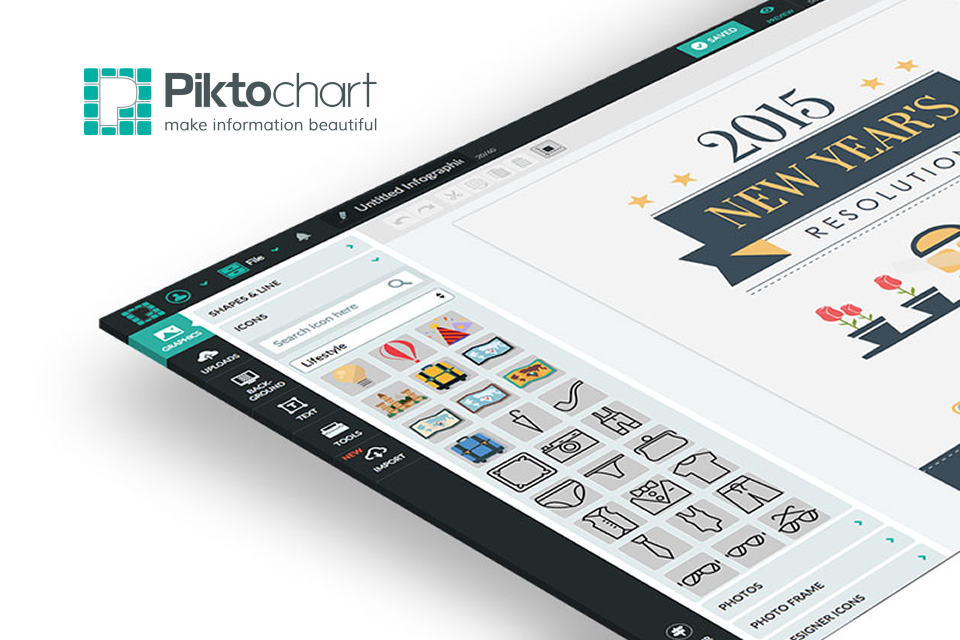
Piktochart goes a lot further than just infographics though and so moves from being a bit of a nice niche tool to being something that is close to invaluable. It includes hundreds of templates to get you started ranging from the aforementioned infographics to reports, from posters to presentations. The editor is brilliant to use as it is just so intuitive, utilising powerful drag-and-drop, point-and-click options which is very flexible.
It also includes over 4000 stunning icons and images within it’s very own library of media and a wide range of layouts to instantly add to your design. We love that you can add data to a Piktochart to create highly engaging data reports (something that is generally just incredibly boring!). The best part being that you can import from Excel, Google Sheets or Survey Monkey.
You also get the option to download your creations in hi-res so that you can use the content offline but you can also very quickly and easily embed your creations on your school website which is a huge boon.
What does it cost?
The pricing? It’s not free, but it’s worth paying for. They also include Education sector packages and they’re a snip! $39.99 for an individual per year but you can also really push the boat out and get your entire class using this brilliant tool for $120 for 4 months for 30 accounts.
Piktochart is used by over 4million people worldwide and is a fantastic tool to play with and is incredibly useful. The team behind the product certainly appear to be enormously enthusiastic about their product which is always a good sign.
Why not have a look around and find out more …
Written by the team at Schudio
We are an owner-run firm in Blackpool, and have been since 2011. We build school and multi-academy-trust websites, the software behind them, and the compliance work that keeps them right. Our posts come out of the audits we run, so they say what we actually see.
A question about this post? Email hi@schudio.com and a real person will answer.
Keep reading

Always Ready
Want your website looked at properly?
Tell us what your site is like to keep up to date at the moment, and we will give you a straight answer on what would help.
Prefer a short email once a week? Get the Schudio newsletter.