How Much Should a School Website Cost?
How Much Should a School Website Cost?
When it’s time to replace your school website, one of the first questions anyone asks is: how much should a school website cost? It’s a fair question, and the honest answer is that it depends. Prices for a new website range from a few hundred pounds to many thousands, and two quotes that look similar on paper can cost very different amounts by the end of the contract.
This guide is for headteachers, school business managers, office teams and trust leaders who want a straight answer. It covers what schools typically pay, the pricing models providers use, what should be included, where the hidden costs sit, and how to compare quotes fairly. If you already have a website you’re happy with, it’ll also help you plan improvements and get more from the package you’re paying for.
The short answer: what a school website costs
Looking across prices UK providers publish on their own websites (checked in November 2026), the typical ranges are:
- Template or ready designed websites: roughly £500 to £1,500 to set up, plus an annual fee.
- Bespoke websites: roughly £1,500 to £6,000 to set up for most schools, more for large secondary schools and trusts.
- Annual fees for hosting, support and the software usually run from around £200 to £1,500 a year, depending on what’s included.
- Subscription models with no setup fee spread the whole cost into one annual fee instead.
Those numbers only tell half the story. The real question is the total school website cost over the life of the contract, and what you get for it. A cheap new website your staff can’t manage, or one that charges for every change, rarely turns out cheap.

Why school website pricing varies so much
Schools often feel that website pricing is confusing, and sometimes it is. Providers bundle things differently, use different words for the same thing and put different items in the annual fee. Many factors affect the final price:
- whether the design is a template or fully custom
- how many pages and features you need
- whether your existing website content is moved across for you
- what the annual fee covers, especially support, training and updates
- the content management system the website is built on
- whether you’re one school or a multi academy trust buying several websites
The trick is to stop comparing headline prices and start comparing the whole package over the same number of years.
The main pricing models
Most UK school website providers use one of three models. None is automatically better. Each suits different schools.
Setup fee plus annual fee
This is the most common model. You pay a one-off setup or design cost, then an annual fee for hosting, maintenance and support. The setup fee is usually lower for a template and higher for a bespoke website. Watch what the annual fee covers, because big changes, new features or a future redesign may cost extra.
Subscription with no setup fee
Here there’s no large one-off payment. The design, build, hosting, support and software are spread into one annual fee. It makes budgeting predictable and avoids a big capital cost in year one. The question to ask is what happens if you leave, and what the fee is at renewal.
One-off build you own outright
Some freelance designers and general agencies build a website, often on WordPress, for a single payment and hand it over. That can look cost effective, but check who will host it, apply security updates, fix things when they break and help when your office manager leaves. Those costs don’t disappear. They just move to your school.
What should be included in the annual fee
The annual fee is where good value and poor value separate. Ask each provider for a written list of what the annual fee covers. As a minimum, expect:
- Hosting, including security certificates, backups and monitoring
- Software updates to the content management system, at no extra cost
- Technical support by phone and email, from real people who understand schools
- Training for staff, including new starters
- Security patches and protection against downtime
- New features as the platform develops
Good providers also include help with the information schools must publish online, accessibility tools and checks, and some reporting such as website statistics. Ask whether Google Analytics integration or an equivalent is available, so you can see how parents use the site.
Hidden costs to watch for
Hidden costs are rarely hidden on purpose. They’re usually just not on the first page of the quote. These are the hidden extras we see most often:
- Content transfer. Moving your current website content across can be charged per page or as a fixed fee.
- Extra pages or sections. Some packages cap the number of pages and charge to add pages later.
- Training limits. One session for two people, then a charge for every new member of staff.
- Support caps. “Support included” can mean a set number of hours or tickets each year.
- Design changes. Small tweaks after launch charged at an hourly rate.
- Redesigns. A paid refresh every few years to keep the site looking current.
- Add-ons. Forms, newsletters, translation, apps or social media feeds sold separately.
- Renewal increases. A low first-year price that rises when the contract renews.
None of these is wrong in itself, but each one changes the true price. Ask about every item in writing before you sign.
Working out the total cost over five years
The fairest way to compare quotes is to add up everything over the same period. Five years is a sensible window, because most schools keep a website at least that long.
Here’s an illustration. These are made-up round numbers to show the method, not any provider’s actual prices:
- Option A, template: £1,000 setup plus £350 a year comes to £2,750 over five years, before any extras.
- Option B, bespoke: £3,000 setup plus £400 a year comes to £5,000 over five years, plus a paid redesign if the design dates.
- Option C, subscription: no setup and £600 a year comes to £3,000 over five years, with support, training and updates included.
Now add the extras each option charges for: content transfer, training for new staff, extra pages, a redesign in year four. The cheapest option in year one is often not the cheapest over five years, and the gap can be large. Build a simple spreadsheet with one column per provider and fill in every line.
Factors that affect school website cost
Design: template, bespoke or fully custom
Design is usually the biggest price driver. A template is quicker and cheaper. A bespoke website design is built around your branding, your audiences and your priorities, so it costs more but fits better. A fully custom build with unusual features costs most of all. There’s more on choosing below.
The content management system
The content management system is the part your staff use every week, so it affects cost long after launch. A user friendly CMS built for schools means less staff time, fewer support calls and fewer paid changes. A general platform may be cheaper to build on but costs more in time and plugins later. Ask for a demonstration, and let the person who will do the editing try it.
Features and functionality
Standard features such as news, calendars, policy pages, staff lists, curriculum pages and contact forms should be included. Extra functionality such as booking systems, translation, parent apps or custom integrations may add to the price. Only pay for features you’ll use.
Content and project management
Someone has to plan the pages, move the content and check it. Ask whether project management and content transfer are included or whether your team is expected to do it. If your team does it, count the staff time as a real cost.
Hosting costs and security
Hosting costs are normally part of the annual fee with a specialist provider, but with a one-off build you’ll pay for hosting separately. Check what’s covered: backups, security updates, monitoring and how fast the site is restored if something goes wrong.
Budgeting for your school website
Website costs tend to fall in two places in a school budget. A one-off setup fee may be treated differently from a regular annual fee, so check with your finance lead how your school or trust records each one. A subscription with no setup fee can be easier to plan for because the cost is the same every year.
When you set the budget, include more than the provider’s price:
- staff time to plan pages, supply photos and check content
- photography, if your current images are out of date
- any add-ons you’ve decided you genuinely need
- a small amount set aside for training as staff change
Planning the whole cost up front avoids an awkward conversation with governors or trustees halfway through the project.
Primary schools, secondary schools and trusts
Primary school website costs
Many primary schools are well served by a ready designed website set up with their logo, colours and photographs. A primary school website is read mostly by parents on their phones, so speed, clear menus and easy updates matter more than elaborate design. That usually keeps the cost lower.
Secondary schools and sixth forms
Secondary schools need to speak to Year 6 families, current parents, students and future staff, often in a competitive admissions picture. That normally means a bespoke website with more pages, stronger admissions content and more photography, so the design cost is higher.
Special schools
Special schools need a calm, accessible design and clear SEND information. The website may not be large, but accessibility and clarity deserve proper budget.
Multi academy trusts
Trusts usually need a trust website and a website for every school. Buying together can reduce the cost per school and bring shared standards, but the overall contract is larger. Ask how pricing works as schools join the trust, and whether the trust gets central oversight of compliance. Our page on multi academy trust websites explains how we approach this.
Template or bespoke: which is better value?
A template is a popular option for good reason. It’s quicker, cheaper and still looks professional when it’s set up properly with your branding. It suits many primary schools and smaller budgets.
A bespoke website gives more flexibility to match your vision and stand out to prospective parents. It’s often the better choice for secondary schools, sixth forms and trusts, or any school that sees its website as a valuable marketing tool for attracting new students.
The value question isn’t really template versus bespoke. It’s whether your staff can update every page themselves, whether support is included, and whether the design can be refreshed later without starting again. You can see examples of both on our school website design page.
Things not worth cutting to save money
Some savings cost more later. These are the areas we’d protect in any budget:
- Accessibility. The 2018 accessibility regulations treat schools as partially exempt, but schools still need an accessibility statement and have duties under the Equality Act 2010. GOV.UK points to WCAG 2.2 AA as the standard.
- Security and backups. The DfE’s cyber security standards ask schools to check the security of cloud services and keep backups in a separate location.
- Help with compliance. Schools must publish specific information online. A provider that helps you keep it complete saves time and worry. Our School Website Requirements guide lists it all.
- Training and support. Staff change. A website only one person can update is a risk.
- Mobile friendly design. Most parents read school websites on a phone.

Questions to ask every provider about price
Price conversations can feel awkward, but providers who work with schools are used to them. These questions get you a clear answer quickly:
- What is the total cost over three years and over five years, including the setup fee?
- What exactly does the annual fee include, and what costs extra?
- Is there a cap on support, training or the number of pages?
- Will you move our current website content for us, and is that included?
- How much will the annual fee be when the contract renews?
- What would a design refresh in three or four years cost?
- Are new features added at no extra cost, or sold as add-ons?
- Do prices include VAT?
Ask the same questions of every company and write the answers into your comparison. If a provider can’t answer one of them clearly, that tells you something too.
What a good quote looks like
A good quote is easy to read and hard to misunderstand. It should set out the setup cost and the annual fee separately, list what each one includes, state whether prices include VAT, and say how long the contract runs and what happens at renewal. It should also make clear what the provider will do and what your school is expected to do, such as supplying photographs or checking content before launch.
Watch for quotes that bundle everything into one vague line, or that list lots of optional extras without saying which ones you actually need. A professional provider will happily break a price down and explain it. If you’re comparing several quotes, ask each provider to fill in your own comparison sheet so every price is laid out the same way.
Buying sensibly and showing value for money
However small the contract, your school needs to show it bought sensibly. The DfE’s Buying for schools guidance sets out the permitted buying routes and links to its Get help buying for schools service. The Procurement Act 2023 came into force in February 2025. Maintained schools also follow their local authority’s financial regulations, and academy trusts follow the Academy Trust Handbook’s value for money expectations.
Your school business manager will know how many quotes you need. In practice, asking three providers the same questions in writing, and comparing the five-year cost side by side, is good practice and leaves a clear record of the decision. Our guide on how to choose the right school website provider has the questions to ask.
Leaving a provider: who owns your content?
It’s worth asking what happens if you ever leave, even if you hope you never will. Your school’s words, photographs and documents belong to your school. Ask each provider how you would get them back, in what format, and whether there’s a charge.
Ask too about your domain name. It should be registered to your school, or transferred to you on request, so you can point it at a new website without losing your web address. And ask how long your old site stays online during a move, because overlap matters if you’re launching a new website around admissions season.
Platform design itself usually stays with the provider, whatever the pricing model. That’s normal. What matters is that your content and your web address can move with you.
How long should a school website last?
Most schools keep a website design for somewhere between three and six years. The software underneath should keep improving the whole time through regular updates, but the look and structure can start to feel dated as expectations change and your school changes.
Factor that into the cost. A provider that includes software updates and offers an affordable design refresh can stretch the life of your investment considerably. One that charges a full rebuild every few years costs more over time, even if the first quote was lower. When you renew with Schudio, a refresh onto a newer design is included, and only larger bespoke work is quoted separately.
A website also needs looking after between refreshes. Pages go out of date, staff move on and policies pass their review dates. Budget a little staff time each term for checking the website, and the design will last much longer before it needs replacing.
What about AI tools and add-ons?
More providers now offer AI features such as writing help, chatbots or automated checks. These are usually sold as an add-on rather than included, so treat them as a separate line in your budget. At Schudio, our AI Suite is an optional add-on at £250 a year. It isn’t part of the standard package, and you don’t need it to have a good, compliant website.
Before paying for any AI add-on, ask what it actually does, who reviews what it produces, and how it handles your school’s data.
Planning improvements to the website you already have
Not every school needs a new website. Sometimes the better use of budget is making the most of what you already pay for.
- Check what’s included. Many schools don’t use the training, support or features already in their annual fee.
- Book refresher training for staff who joined since launch.
- Tidy the content. Remove out of date pages, turn PDF letters into web pages and check every link.
- Review compliance against the current requirements.
- Ask about a design refresh before paying for a full redesign.
If you’re a Schudio school, our support team are always happy to help you plan this, and the cost is usually nothing more than your time.
A checklist for comparing website quotes
- Setup or design cost, in writing
- Annual fee, and exactly what it covers
- Price at renewal, and how it can change
- Content transfer from your current website, included or charged
- Number of pages included, and the cost to add pages
- Training for all staff, including new starters
- Support: unlimited or capped, phone and email
- Software updates and new features included
- Hosting, backups and security included
- Help with statutory publishing requirements
- Accessibility standard stated, with help on your accessibility statement
- Cost of a future redesign or refresh
- Add-ons and what each one costs
- Contract length and notice period
- Total five-year cost, calculated the same way for every provider
Common mistakes to avoid
Comparing year one prices only
A low setup fee can hide a higher annual fee or lots of paid extras. Always compare the total over the same number of years.
Ignoring staff time
A website that’s slow or awkward to update costs hours of staff time every week. That time is money, even if it never appears on an invoice.
Paying for features you won’t use
Long feature lists look impressive. Pay for what your school will use in the next year or two.
Assuming “unlimited” means unlimited
Ask what unlimited support actually covers, and whether it includes help with content, training and future updates.
Leaving it too late
Choosing a provider in the last few weeks of a contract leaves no time to compare properly. Start six to twelve months before your current contract ends. If you’re still in contract, our post on switching provider without paying twice explains one way round it.
How Schudio prices school websites
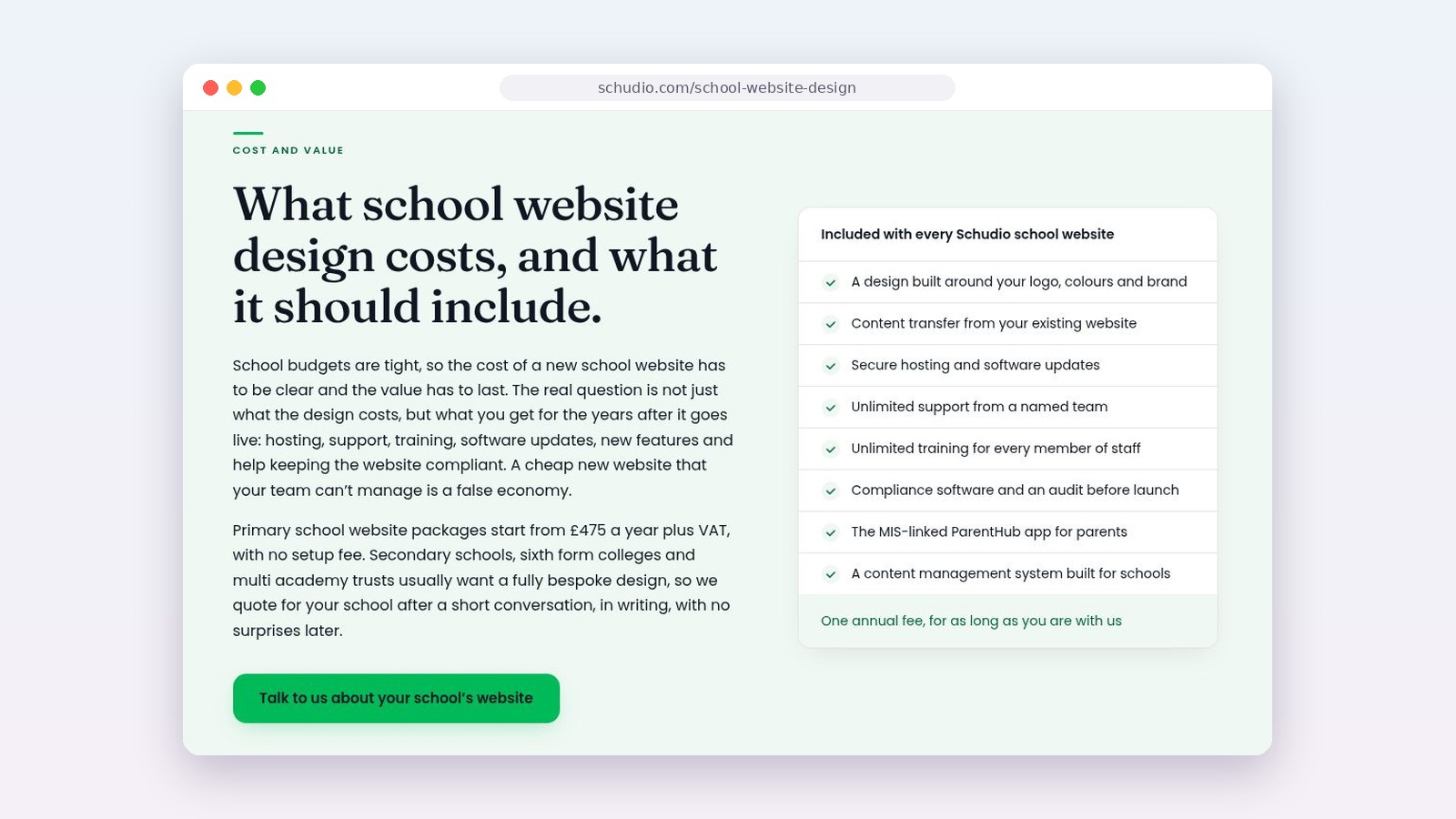
We’d rather be clear than clever about pricing. Primary school website packages start from £475 a year plus VAT, with no setup fee. Secondary schools, sixth forms, special schools and multi academy trusts usually want a fully bespoke design, so we quote in writing after a short conversation, with no surprises later.
Every Schudio school website includes a design built around your logo, colours and brand, content transfer from your current website, secure hosting and software updates, unlimited support from a named team, unlimited training for every member of staff, compliance software with an audit before launch, the ParentHub app, and a content management system built for schools. It’s one annual fee for as long as you’re with us. The AI Suite is the one optional add-on, at £250 a year.
If you’d like to know how your current website measures up before you decide anything, our school website audits are a good starting point.

Frequently asked questions
How much does a primary school website cost?
Published prices suggest roughly £500 to £1,500 to set up a template website for a primary school, plus an annual fee, or a subscription with no setup fee. Schudio primary school website packages start from £475 a year plus VAT with no setup fee.
How much does a secondary school website cost?
Secondary schools usually need a bespoke website, which typically costs more to design, often a few thousand pounds, plus an annual fee. Ask providers for a written quote and compare the five-year total.
What is a typical annual fee for a school website?
Annual fees usually run from around £200 to £1,500, depending on what’s included. Check whether hosting, support, training, updates and new features are covered.
Are there hidden costs with school websites?
Common extras include content transfer, extra pages, training for new staff, capped support, design changes, redesigns, add-ons and renewal increases. Ask for everything in writing.
Is a cheaper school website a false economy?
Not always. A good template can be excellent value. It becomes a false economy when staff can’t update it, support is limited or every change costs extra.
Do we need to pay for hosting separately?
With most specialist school website providers, hosting is included in the annual fee. With a one-off build from a freelancer or general agency, hosting is usually a separate monthly or annual cost, along with security updates and backups. Check which applies before you compare prices.
Is a subscription with no setup fee better value?
It can be, especially if the annual fee includes design, support, training, updates and a future refresh. It also makes budgeting simpler. Compare it with setup-plus-annual quotes over five years to be sure.
Should a multi academy trust buy every school website from one provider?
Buying together often lowers the cost per school and gives shared standards and central oversight. Make sure each school can keep its own identity, and check how pricing works as new schools join.
Can a school reclaim VAT on a website?
That depends on how your school is funded and set up. Ask your school business manager, local authority or trust finance team before you budget.
A final word
The right school website cost is the one that gives your school a website it can keep current, compliant and welcoming for years, at a price you can predict. Compare the whole package over five years, ask every provider the same questions in writing, and think about the staff time behind every option. If you’d like a straightforward conversation about what your school needs, we’re always happy to help, with no pressure either way.

Related Posts

Ian Richardson
October 26, 2026
PDFs are disappearing from school websites. Here's what the school website accessibility rules say, why phones changed everything and how to move on calmly.

Ian Richardson
October 20, 2026
What should a school website look like in 2027? The school website trends that matter for UK schools and trusts, with a practical checklist and an FAQ.
Ian Richardson
October 13, 2026
AI-generated school content saves time, but accuracy, tone and safeguarding still need a person. What DfE guidance says, who reviews what, and a checklist.
Ian Richardson
October 7, 2026
What a school website chatbot should answer, what it should never answer, and how to get your pages ready before you switch one on. A guide for leaders.

Ian Richardson
September 30, 2026
What schools should not use AI for, the AI safeguarding risks behind each limit, what KCSIE 2026 now says, and a practical checklist for school leaders.

Ian Richardson
September 16, 2026
Introducing the Schudio AI Suite: AI school website software that checks what you publish, drafts pages in your school's voice and answers parents' questions.